
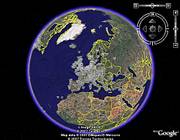
If you want to explore planet earth from your home, Google Earth is the place to start.
Fly over our world and zoom into different locations, skim through your own neighborhood in bird's eye view, dive into the Grand Canyon, follow the Great Wall of China or have a peak onto the rainforest, maybe you'll discover an exotic animal. There is nothing like it.
To make Google Earth even more fun, I have a few treats for you today.
Cool Google Earth Resources
These are the websites you should visit if you are looking for background information, insider news, adventure, exciting discoveries or sights.
Google Earth Blog - Here you'll find the latest news, interesting sights, helpful tutorials, technology, and happenings for Google Earth.
Google Earth Cool Places [No Longer Available] - This website features a huge collection of extraordinary sights. Click yourself through the screenshots on the front page, roll the dice for a random image, rate the sights, leave a comment, browse the categories and if you find something you want to explore further, open the placemark in Google Earth. Endless fun, reserve an hour or two for this trip.
Google Sightseeing - Discover the most unusual places and sights found on Google Earth. View the latest or browse by location or category. All images are commented and of course a placemark is available at the bottom of each post.
Google Earth Community - A forum with thousands of screenshots, images and placemarks as well as articles on various topics.
GE.findr - A Google Earth search engine.
Earth Contest [Broken URL Removed] - The world's biggest interactive and free game, where players use Google Earth placemarks, follow clues and utilize the Checkpoint feature to beat a GameMaster. Probably the most exciting live adventure you can complete right from your desk.
Google Earth Plugins
Panoramio - Share your photos with the world right inside Google Earth using Panoramio. The plugin enables you to see all photos people have posted for locations worldwide. To upload and share your own favorite shots you have to sign up for an account. Up to 2 GB storage is free.
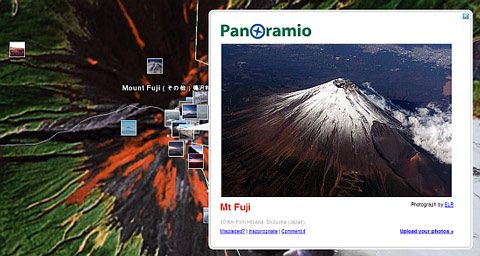 Mount Fuji surrounded by thumbnails and one photo featured by Panoramio.
The World Wide Panorama [No Longer Available] - This one works similar as Panoramio, but instead of plain images offers 360° panoramas.
Night Lights of the World - NASA has provided several interesting layers for Google Earth, one of them showing the blue planet at night.
Realtime Weather Observation Overlays - Weather Bonk offers weather overlays with data in degrees Fahrenheit or Celcius with or without wind barbs.
Geepeeyes - A GPS plugin that supports the NMEA protocol. Geepeeyes plots location, trail, speed, heading and speaks the driving directions on a dynamic map view even if Google Earth is offline and cached.
CBS News Seismic Monitor - Offers scroll through or playback of worldwide seismic activities for the past seven days.
Google Moons - This plugin contains 34 real scale 3D models of the largest natural satellites in the Solar System crammed around the earth inside Google Earth. Very nice model for size comparison.