


Does this bug you as much as it bugs me?
http://www.howmuchlongercanmyurlsget.com/before/Igo/totally/insane.htm
If you're blogging or uploading files frequently, passing out lengthy links to your posts can get pretty tedious. That's where URL truncator services come in, stepping up to provide a shorter link that's easier to remember and share. There are a ton of options out there, and most have something unique to offer.
Probably the best known truncator around, TinyURL offers the features most people are looking for: an easy to remember domain name, fairly short (though at 6 characters it's double what some create) identifier, and a preview page for your shortened link by using "preview.tinyurl.com/[link]". Their page also automatically copies the new URL to your clipboard, and they offer a bookmarklet.
You can't really fault TinyURL for not being able to pull off three-character identifiers like some of the other services I listed - they claim they have more than 74 million in their database and receive 2 billion hits a month. With numbers like that, it makes sense that they need a couple more letters.

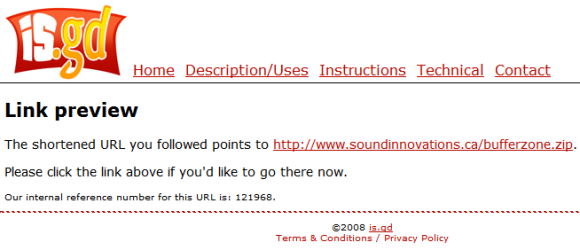
A single blank box for your address on the main page (which is totally uncluttered) and you're sent to the finished product. If you've got Flash enabled, the new URL is automatically copied, which is pretty slick. You're also given the option of sending your visitors to a preview page first by simply adding a hyphen to the end of your new URL. I really like this idea, especially if you're linking directly to a file and not a web page - just in case your visitors need to be able to right-click and save as to get it.
This is about as short as you can get, my URL weighing in at just 9 characters including punctuation. Not bad.
Again, very simple interface; fill in one blank with your URL and receive a three-character, truncated version. There's not really much else that URL.ie does, but they do offer a bookmarklet for you to drag onto your Firefox bar - something is.gd doesn't offer.
Something is a little amiss with their CSS code, and it didn't present well in Firefox. Specifically, the button I needed to click to create my URL was mostly covered by the tools and contacts links.

Still, hitting enter still submits the form, and my shortened URL comes with a stats view - nice! All it gives you is creation time and total number of hits, but it's still a nice addon to throw in. Better yet, they allow 2MB file uploads with automatic URL creation. No, it's not a ton of space, but it's a nice offering from a truncator. It's a nice way to quickly share a .zip with a bunch of documents or photos. They also provide a bookmarklet, Firefox extension, and API access!
jmp2.net
The only service I've used so far that offers URL masking, which doesn't really provide much anonymity anyways, but it is a feature some may look for. Again, creation was simple, and they offer a Firefox addon for URL creation.
w3t.org
Offers a "tag" feature, which can be very useful. Using my test link I added the tag "demo" to it and was given "http://w3t.org/c/demo." The untagged version came across as "/u/7wal" so there's definitely some value to tagging with this service. Their creation page is more cluttered than the other sites reviewed, with links to several other sites in their "network."
If w3t cleaned up their page and Ajaxed it, it would be this. Xil.in is a single page with tag support. Once you've filled in your URL and tag, the resulting truncated URL appears beneath the form in red text. Short, sweet, and a welcome change from being redirected to a second page. They offer Firefox integration in the form of a search bar, which works nicely to create new URLs.
The only site to offer a Windows client, a somewhat unique method of creating URLs. Download and install the client, and it sits in the system tray. Copy the url you want shortened from your browser, click the icon in the tray, and a pop up balloon notifies you of the new URL. It's also automatically pasted to the clipboard. I can see this being useful if you're someone who needs to create a lot of short URLs and blog them.

They also offer a bookmarklet for both Firefox and IE. Unlike a lot of the other services, xaddr checked to make sure my URL was valid - it didn't create a link to a non-existent file like the others did.
doiop.com
Doiop is a little different in that they don't offer alphanumeric URLs like the other services. Instead, you pick a word: http://www.doiop.com/snickerdoodle. The downside is, obviously, that someone else may have taken your word - which can make the process a little frustrating. There's no bookmarklet, toolbar, or anything else to ease the process either.

The best for last? Snurl offers the usual single-blank url truncation, but they go way beyond that. Register on the site, and your "snips" will be stored and you can manage them whenever you want - and clickthroughs get automatically tracked. Awesome! What's more, the management page offers emailing of any or all of your snips and instant sharing with the usual suspects (Digg, Reddit, Stumbleupon, etc.).

Snurl is so smart, it even creates RSS feeds for your snips. How cool is that? Sharing a pile of links is as easy as letting people subscribe to your feeds. You can also change the default domain name amongst snurl.com, snipr.com, and sninpurl.com at your leisure. Worried people might randomly leech your links? You can set a private key up and it will be automatically added to your new snips.
These features put Snurl in a class by itself, and I'd say it's easily the most advanced truncator available - but what do you think? Have you found a service that you think is better? Go ahead, comment on it!