
Do some reading on the go. Kobo's Android app is perfect for your tablet or smartphone, and it couldn't be any easier to use. Whether you want to quickly browse thousands of free books or pay for the latest best-sellers, Kobo's got you covered.
In my opinion the best digital reading experience is on an e-ink screen, which is why I love my Kobo Wireless. Sure, it's out of date, but all I need it for is reading. Sometimes you don't have your ereader with you, however, and that's when Kobo for Android comes in handy. If you own a Kobo, and bought books for it, there's no reason not have this app. It syncs with your reading material.
Even if you don't own a Kobo, however, this app is worth checking out. It offers thousands of free books and can easily sync with your computer. It also offers comments on individual pages in any book, something no other reading app currently offers.
Reading On Android
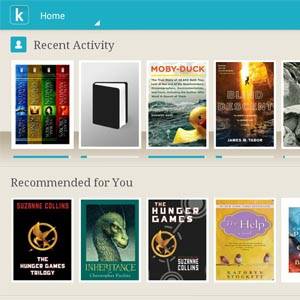
Fire up the Kobo app, log into your account and you'll be presented with your books along with some recommended titles.

Tap any of your books to start reading, or head to your personal library. All of the books you've previously purchased for Kobo will show up here.

There are free books, mainly from the public domain, if you want to try out the reading experience before paying for anything. Speaking of: what really counts when it comes to a reading app is the actual reading experience. Kobo delivers: the app gets out of your way and lets you focus on your words.

Don't like the look? There are limited customization options. You can't pick just any font, size and color but you can select from the limited options:

This should be flexible enough for the vast majority of people, and all the choices look good.
One feature – or annoyance, depending on your point of view – is comments for every page. Kobo's Android app allows you to leave comments while you're reading the book, and you can also see what other people have to say.

Personally I find this a distraction from the reading experience, but if you love reading comments below web articles you'll also enjoy this.
One other annoyance: if you subscribe to any newspapers or magazines using Kobo you cannot see them in the Android app. That feature seems to be limited to Kobo devices and iOS apps, for some reason.
Importing Other Books
Do you have other ebook files on your computer? Assuming those files are DRM-free, you can easily import them. Just run the import wizard and the Kobo app will grab them:

Note that imported books will not sync with your other Kobo devices; that only works with books you find in Kobo's store.
Conclusion
Kobo's app is worth checking out, if you enjoy reading. Sure, Kobo offers its own tablet, but why purchase a dedicated device when any Android one will do? All you need to do is install the Kobo App and any Android device can do the job.
How do you like the app? Let me know in the comments below, or recommend other Android readings apps.