
Pidgin – Tips and Tricks
Pidgin (formerly GAIM) is a good multi protocol instant messaging client. I won’t say it’s the best out there, but it’s still good and worth using. If you frequently hang out on multiple instant messengers, dispose them all and start using Pidgin. Here are some tips for those who’re using Pidgin already and those who’ve just downloaded it:
Plugins
Ah! Most Open Source applications allow you to install plugins to add additional features, and Pidgin is no exception. It comes with a set of plugins that are deactivated by default. You can go to Tools >> Plugins to configure them.
Buddy Notes and Buddy Status Notifications are two cool plugins among others in the list. Can’t get enough from Pidgin? Want character counter? Maybe a plugin to synchronize your chat history across multiple PCs? Add more functionality with more plugins. Even more plugins here.
Buddy Pounces
This is a relatively powerful feature in Pidgin, and could turn very useful. Basically, it’s like making Pidgin perform an action when a buddy signs in/out/sends a message and so on.
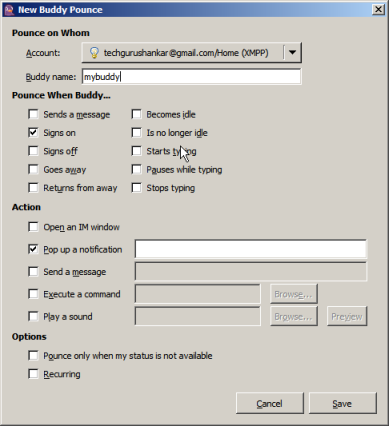
You could set sound alerts, make Pidgin automatically open the chat window, or execute a command or an application.
So how do you set up Buddy Pounces? Just go Tools >> Buddy Pounces and click ‘Add’ to configure.
Control Idle Status
From Tools >> Preferences >> Status/Idle, you can control settings related to your Idle Status. You can configure Pidgin to report idle status based on keyboard/mouse use, or last message, the minutes before idle status and also set the status message to be displayed if you go idle.
Chat History
You can set Pidgin to log chats and conversations in basic text/html format by going to Tools >> Preferences >> Logging.
Themes
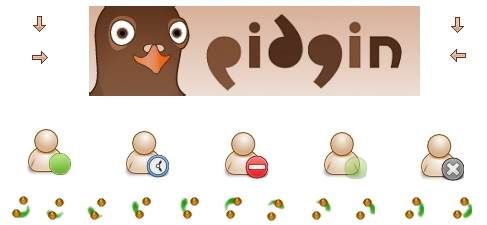
The beauty of Open Source, may be. There are a variety of themes available for Pidgin, and you could grab one yourself and give a new look to the multi protocol IM. Get Pidgin themes from here (search for pidgin).
Customize Fonts
Yes, that’s possible. If you dislike the default font sizes, you can alter them from the Tools >> Preferences >> Conversations dialog box.


Although Pidgin is vastly superior to Trillian, I am still getting a little bored with Pidgin. I am hoping that in the near future, Google Talk is able to do what Pidgin does and accommodate contacts from other IM platforms.
Yup, I’m also eagerly waiting for the next version of GTalk. I hope the developers are working on adding new things to it. But I still love the way it is though, it’s pretty much very minimal for an IM.
Google Talk is able to do what Pidgin does and accommodate contacts from other IM platforms.
We all wish …
Is there some way to make everything in Pidgin smaller? It eats up a lot of screen space compared to a trimmed down miranda for example. I only need a very small contact list window with no border and no heading and about three tray area icons wide. Can that be done with Pidgin?
Jan,
I tried looking in the settings, and I couldn’t find anything like adjusting the contact window sizes, etc.
But in replacement to the list, you could use the Buddy Ticker plugin by activating it from Tools >> Plugins.
Shankar,
Thanks for the reply but the buddy ticker does not do what I want, since I can’t get a vertical, non-scrolling list through it.
Here is the smallest size I can get for the regular buddy list. For 99% of my pidgin use I only need the area marked with red (but with even less width than that). That is, a list of names plus a status icon for each name. The other features could be put in a tray area icon right click menu.
http://img82.imageshack.us/img82/1936/pidginpm6.png
I love pidgin… but its missing 2 good things…
1.Broadcast: i mean send message to multiple contacts from your list at once. ok i can live without this. but 2nd one is most needed..
2. pidgin makes small chunks of files for logging. it makes separate file for each session between same contact also… instead it must use history db like miranda im or can use separate log history file for each contact… right now its making many fragments in memory..very large number of files harming my HDD.
Parth barot.
Thanks for dropping by man. I too don’t like Pidgin for one reason: most of the time, file transfers don’t go well when using it.
AIM ones seem to work fine. The XMPP protocol simply doesn’t support them though.
(Comments wont nest below this level)Hi, I was told that the HDD cannot be fragmented in Ubuntu, because the way it handle with files, totally different to Windows.
Can someone tell me if Pidgin could really harm my hard drive??
Please look at http://geekblog.oneandoneis2.org/index.php/2006/08/17/why_doesn_t_linux_need_defragmenting
While Linux filesystems *can* get fragmented, it only happens when the drive is very full.
(Comments wont nest below this level)That’s not right. Having separate files means it’s not getting fragmented. Fragmentation occurs when you try to write big file and don’t have a large enough chunk of free space. If it was all in one giant DB, that would happen. The separate small files mean each file can be perfectly contiguous instead of fragmenting. Also, the number of files you have has no effect whatsoever on your hard drive. It cannot possibly be harming your drive. If your drive is dying, that’s because hard drives have moving parts and just sorta die after a while.
Having a lot of files doesn’t “harm” your hard drive. That’s what it’s for. The amount of space taken by having many small text files compared to one large file is negligible.
I love Pidgin simply because it helps me to identify the person who has blocked me on google talk- a feature that is missing in GTalk.
Thanks mate, I was looking for some pidgin review. I am using it for not very long time but I am satisfied with it.
I agree that Pidgin is *HUGE* – even in “small Buddy List” mode – compared to Miranda. I suspect much of the blame lies with gtk-win32, which I never liked. You know, maybe if you guys used the Windows APIs it wouldn’t take you years and years to figure out how to display webcam video.