
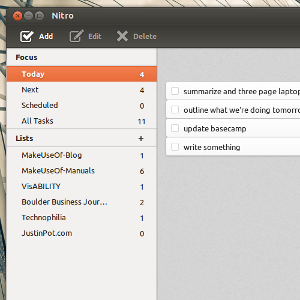
Put together a to-do list, then do your work. If that's what you want to do, but you've not yet managed to find software that works, give Nitro a shot. This Linux software, which also works in the cloud, is fast and easy to use. Even better, it lets you sort your tasks, meaning you're only looking at what you need to do right now.
It's easy to get so caught up in to-do lists that you never actually get anything done, which is why extremely simple to-do lists are a good idea. Some people need more control than that, however, which is why software like Wunderlist and Remember The Milk are so popular.
Nitro is more advanced than simple, and primarily intended for Linux users. Using the web app, however, users of any operating system can give Nitro a shot. Is it right for you? Let's take a look.
Using Nitro
If you've ever used a to-do list program, the main interface of Nitro certainly won't confuse you. You'll see the usual way to sort your tasks, including the time and date something is due, and optional lists:

The top categories break things down depending on the dates you've assigned tasks, while the "lists" are essentially categories you design.
In any of these lists you can add tasks. You can also add notes. Unlike other solutions, the note field shows up while you're adding a task. This makes adding notes a snap:

By default Nitro only works on a single computer. Syncing is easy, however, thanks to Dropbox and Ubuntu One integration.

The sync was slow for me, occasionally to the point of being unusable. I'm sure the team is working on it, but if this is important for you you might want to look elsewhere for now.
On a less important front - themes! There are a variety built into Nitro, most of which intended to make the program blend with skins in Ubuntu and other Linux distros:

There's another that makes Nitro look remarkably similar to another online to-do service:

For the sake of all that is sacred - don't load the Justin Bieber skin. It's not worth it.
Set Up Nitro
Ready to get started? Head to NitroTasks. You can log in there using your Dropbox or Ubuntu One account, or download the program if you prefer using desktop software. There are packages for Ubuntu and Arch Linux, and source code for industrious users of other Linux distros.
Sorry, I can't help you compile the code. Ask at MakeUseOf Answers before doing so in the comments below.
Conclusion
Yeah, it's another to-do list. But this is a rare native program for Linux not yet found on other platforms. Even better - it's really good. I hope the sync improves in the future, because I think I'll have a new favorite to-do program when it does.
How do you like Nitro? Leave your thoughts in the comments below, along with any other Linux to-do software you might prefer over this.