
<firstimage="https://www.makeuseof.com/wp-content/uploads/2011/07/titleimage.png">

It's human nature to want what we can't have. I don't know about you guys, but I'm perfectly happy with my iPhone's keyboard. Still, I saw the videos of people demonstrating their Swype keyboard on their droids and I got a little jealous. Even though I'm an admitted iPhone fan, and would never own a droid, I still don't want them to have any features that I can't.
Thankfully, this is rarely a problem. With a jailbroken iPhone you can make your phone do pretty much whatever you want, but I have yet to see someone attempt to make a good version of the Swype keyboard available - until now. As long as your iPhone is jailbroken you will be able to install the iSwipe keyboard and Swype away.
If you are hesitant about jailbreaking, and want to learn the pros and cons, check out this article. Besides cool applications like Swype Keyboard, this article covers some of the other consequences that come along with jailbreaking your iPhone.
What Is A "Swype" Keyboard?
A Swype keyboard is a touchscreen-based keyboard that allows you to type without lifting your fingers off the screen between each letter. You simply slide your finger around the screen and make a slight pause when you get to the letter you want. The phones processor extrapolates what you are likely typing and, generally, adds the correct word for you.
In theory, this would allow you to type much faster since you are just drawing the word on the screen and not tapping each letter individually. Swype for Android is one of the 100 best Android apps, so it's definitely something that is popular, and I think will find itself right at home on iOS devices.
How To Install iSwipe Keyboard
First you have to jailbreak your iPhone.
Once you have a nicely jailbroken iPhone, the next step is to boot up Cydia. You will not find the Swype keyboard on any of the default repositories, so first you have add the repo that hosts the app.
To do this first open Cydia, click on manage, then sources, then click edit on the top right of the screen, then click add (+). The add source dialog box will come up, type in
http://wynd.x10.mx
and click Add Source.

Once you have their repository on your list go back to manage sources and click on Wynd repo. On that screen you will see iSwipe, click it and then click install on the top right of the screen.

Allow Cydia to run through the installation process and, when prompted, click restart springboard. This will take a few seconds, and once completed you will have iSwipe added as your keyboard.
Using iSwipe
At first it will take a little getting used to, especially if you are like me and have used an iPhone since day one. Obviously, when your brain is conditioned to use a certain type of keyboard, any type of change can feel a bit off, but this might be a change that is worth getting used to. The program is early in development, which is why you won't find it on any of the main Cydia repos, but it works extremely well for something so early in its life cycle.
To test it out, open up any application on your iPhone and touch a letter and slide your finger over to the next letters in the word and see what comes out. Hopefully, the word you are trying to type will come out, but if it doesn't, the program suggests some other words along the bottom the screen that are close to what you are trying to say. If none of these are correct, and you just can't get it to make the word you want, you can still type like normal by just tapping on the letters. This is a nice addition if you are trying to type in something like a website URL that the program will not recognize.

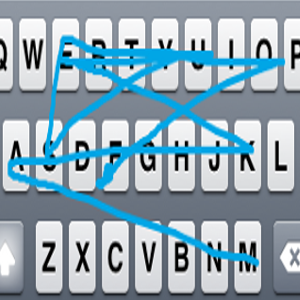
The program will show you a line across the letters to let you know the path your typing is following. (That was "makeuseof" I was typing into my Notes app).
Conclusion
For a program that is so early in development iSwipe is looking very promising. Even at this early stage it works very nicely, and I can't wait to see how it comes along as development continues.
If you install iSwipe on your iPhone, leave us a note in the comments and let us know how your experience with the app went.