Improve Your Photo Booth With 90 Free Effects [Mac]
Every Mac that comes with an iSight is loaded with Photo Booth. When I was Mac-less, I used to frequent Apple stores and somehow Photo Booth seemed to appeal to me then. Sadly, after I bought a Mac for myself, the attraction didn’t last very long and later, I sort of forgot about this nifty application which attracted me in the first place.
To bring back the romance, I went on a search to see if I could add more effects to Photo Booth. There were only a few interesting pre-packaged ones and most of them had something to do with image distortion (squeeze, bulge, dent, mirror etc.). That was fun for a while but I need the “Wow” factor back desperately.
In my search, I managed to uncover a few sites that offer a good collection of free Photo Booth effects.

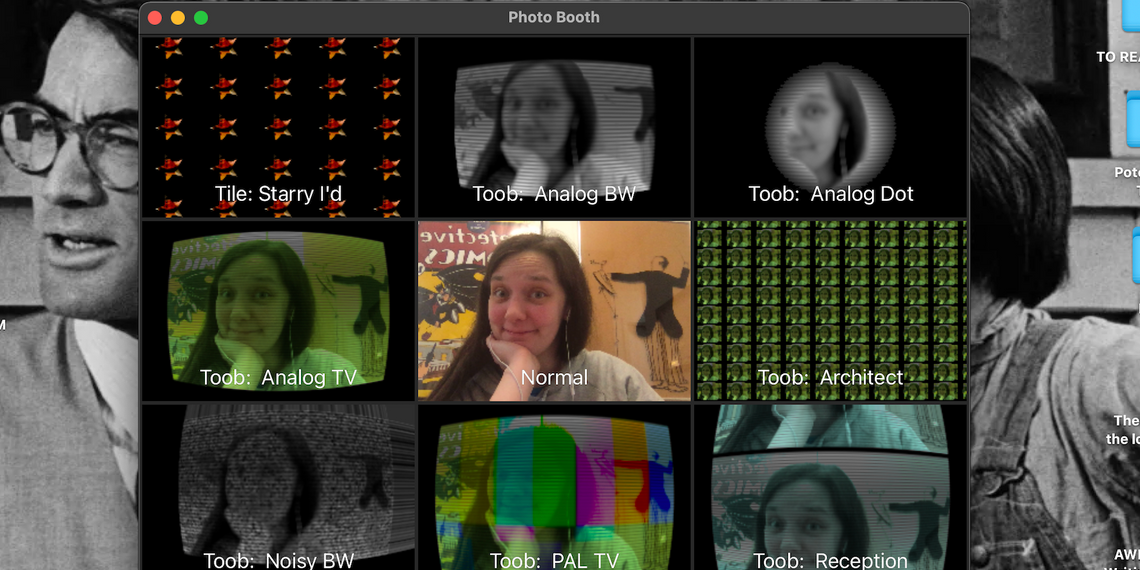
From B-L-A-C-K-O-P, I found CatEye, which is a collection of 5 sets of effects. Each set has its own theme:
I especially like the BoobToob set, it makes me feel like I’m on television. If you’re sick or bored with the default Photo Booth effects, this will definitely bring back some fun.
CatEye will only work on Leopard and is free (direct download link)

From another site called Macpoupou Factory, I found a collection of Mac Photobooth effects which has been around for quite some time: MoreIchatEffects. After adding these effects, I realised that I have been missing out on a lot of fun! The effects are incredibly awesome beyond the ones Apple provide, especially Hologram – if you’re a Star Wars fan, you’ll love this one. It’s strangely uncanny.
Besides that, several other effects like ASCII art and Line Overlay are pretty cool.


MoreIchatEffects bundles 48 different effects and will only work on Leopard.
I can’t remember how I managed to find this next site but it offers 4 Photo Booth effects (Leopard only), from which I only like one. Visit the site and guess which one it is and let me now in the comments. (Hint: Did you know that Photo Booth has the ability to record video? You can ask Bush what he thought about the shoe).
Finally, a Photo Booth effect that must not be left out: Obamafy. Following in the footsteps of President-Elect Barack Obama, you can now quickly and simply create your “Hope” posters. Remember, Leopard only.

Depending on the user-level for which you save these effects (for ‘All Users’ or for ‘This User Only’), they will either be saved in /Users/{your username}/Library/Compositions or /Library/Compositions. In order to remove unwanted effects, just delete them from the appropriate folder. Keep in mind that if you add a lot of new effects at once, Photo Booth will crash while loading them. It’s best to add one set at a time.
Also, these effects will work with iChat! So, you can fool your friends into thinking that something’s gone wonky with your iSight or that they’re really seeing you through a hologram.
Got more effects to share? Know about other ways to bring back the fun to Photo Booth? Share with us in your comments. Lastly, if you’d like to use your iSight for something more productive, check out my article on Gawker and Eyesight.
(By) Jackson Chung is a confused writer, nervous photographer, surreptitious DIY-er and an insomniac. He is also the Assistant Publishing Editor for MakeUseOf.com


THANK YOU!! These are great!!
Thanks!
Hello, really cool post but not working for me! well the cat eye one isn’t anyway. i put the files into library/comp as instructed but my photobooth looks the same, am i doing something wrong?
Did you use CatEye’s installers or did you manually drag every one into /Library/Compositions? If you didn’t I suggest that you use the installers.
thank you, should have been obvious I suppose, oh well!
(Comments wont nest below this level)cool
thanks man, these are awesome!
Now my photo booth crashes incessantly. Thanks!
Hmmm, I had that problem as well. I stated that at the end of my article. Photo Booth can’t render the effects properly if you add all of them at once. You need to add them one set at a time and try browsing through the effects with the arrows, avoid clicking the squares
Same here. When you click on the next box for effects it crashes. So use command and the arrow keys to cycle through. it works this way
They look awesome, but I’m on Leopard yet… did you find any for Tiger?
A quick browse did reveal some commercial options. WebcamTweaker and Freakshow. I’ll report back if I find anything else.
i am kinda new to this but how do you download the effect?? where do you go to??
Click on the links in the article to download the effects, then use the installer to add them to Photo Booth
Having same problem as Bob above me. I now understand how I should have installed it properly, but what do I do now that the damage is done? How can I make photoshop work normally again? Each time I try to use an effect photoshop closes. Thanks!
It’s actually quite easy, you’ll need to remove the effects. They’re stored in /Users/{your username}/Library/Compositions or /Library/Compositions depending on the user level which you installed them. Try removing until you find that Photo Booth works again, then re-add the effects slowly.
I did this, and I can NOT find my photobooth. I checked everywhere. I tried the Mac OS X Install Disc, and I’m not sure where I download it. I couldn’t find “INSTALL PHOTOBOOTH” sort of thing. PLEASE HELP. I need help with this. I can’t find it! AND IT’S DRIVING ME NUTS.
(Comments wont nest below this level)So will this only work if you have leopard or ichat4?
Unfortunately, yup
“Obamafy???” that’s a sad oversight. should be “Shepardize.”
These are great…. thanks so much for posting these!!!
awesome collection! i always got bored of the ones that come with photo booth i never even realized you can add more to it im gonna have to start googling to find more!
i love effects
Lovely to see you people enjoying yourselves with these effects
i have deleted the apps from my mac but it is still in my photobooth how do i get rid of it from my photobooth!!! its making it slow. someone help me. i went to library and everything bt i cant find the application i moved it to trash already but it’s still in my photobooth these effects!! i downloaded both the cateye and moreichateffects.
how do i delete it permanentlt??
Hi, take a deep breath and calm down.
This happens when you load too many effects into Photo Booth, like I stated in my article
First, you’ll need to go to /Library/Composition and delete everything in that folder. Those are the effects. Then, you’ll need to load the effects a few at a time. That lessens the burden on Photo Booth to render the graphics.
Let me know if it works.
oh haha got it thank u so much. okay so now after i install one set of effect how long of a gap should i have before i start installing the next one?
i think it was jammed because i download moreichateffects together with cateye. so ya catastrophe!
OKAY THANKS SO MUCH
You should add one set, start Photo Booth, click on the effects and let them load. After that you may add more effects
which should i download if i only want the set with the effect “Obamafy”. Which set is that? Please let me know thanks
That would be the Obamafy effect http://www.dubster.com/obamafy/
Wow, I never realized more effects could be added to Photo Booth or iChat. Cool stuff.
Hey Guys.,.
jusT lookinG for The fellow wHo made The Vieo of my band and my sonG.
i would like To conTacT Him.
my e – mail.
HowTokillmusic@Gmail.com
..
THank. y. o. u.
- c a r e.. f……
PLEASE PLEAAAASE HELP ME
THIS IS MAKING MY COMPUTER SOOOOOOSSOSOSO SLOW
and i dont know how to delete it!
i tried the compositions thign but i dontwana delete the originall photo booth effects!
just thesseee onesss !
and theseeee ones arnt showing up in composition plllllllllllllllllllllllz plz help asap
The empty compositions folder you are referring to belongs to your home folder /Users/You/Library/Compositions/
You need to access the Compositions folder on your root drive /hard drive/Library/Compositions/ everything in there are the effects you added. You can delete everything to get your Photo Booth running properly again.
how do i download only thr obamify one??
What do you think about http://www.stockfreephoto.eu
THIS IS IMPOSSIBLE,
i downloted it and then they are all just in a folder what do i do now?
where do i bring it?
HELPP ?
Which one did you download?
i down loaded catseye
(Comments wont nest below this level)When i what to remove it i go to library and check after Compositions but i don’t got that folder, how the f*** am i suposed to remove them now eh?
The Compositions library is in your root drive (hard disk) not your home folder (the one with your username)
wait.. can you give steps to go to this folder??
(Comments wont nest below this level)also my new photobooth effects have green lines too… could you tell me how i could FIX them instead of just uninstalling them??!
thanks
heeey!
ok, so i downloaded these effects and i really like them, but there are a few that i downloaded a while ago that i wanna get rid of the, how can i do that?
its making my photo booth SLOWW
pleaseeee help mee
THANKS A LOT
Please read the comments above about the Compositions folder
Razan how did you download it….
what did you press where is the writing download??? i really wanna download these effects but how!?!?!?!?!?
Hi. What do you think about http://www.stockfreephoto.eu
I do not know how 2 do it! How do u do it. I cannot download it! :C help!
question.
how do i UNINSTALL the effects of what you mentioned down below? i no longer want them on my macbook anymore. how do you uninstall them??
“# RetroPixels – adaptation of 60’s and 70’s video effects.
# Love For 80s – bringing back Space Invaders, Pong and VHS (yes, that’s video tape quality, ladies and gentlemen!).
# Bent Pels – optical image distortion with a twist.
# BoobToob – a set of TV screen effects.
# FewTile – tiled-images effect.
I especially like the BoobToob set, it makes me feel like I’m on television. If you’re sick or bored with the default Photo Booth effects, this will definitely bring back some fun.”
ii dont like know hot to download it. like its confusinng. aha. well i meaan i like installed it but nothing happened to photobooth…? maybee im doing something wronng. idk!
there’s a lot of green lines on each effect for me how do i get rid of them
Please read the comments above regarding the Compositions folder.
I want to uninstall the effects, because they are making my macbook extremely slow. I have deleted everything off of my computer, and the effects are no longer (nor ever were) in my compositions folder but they are still showing up. Any advice?
Please read the article above regarding the Compositions folder. The Compositions folder is in your root drive (hard disk) not your home folder (the one with your username)
awesome thnx
how do I donwload this themes?
HELP! i dont have a compositions folder in my library? what do i do?
omgg thank you SO MUCH!!
were is my obamayfy i dont have it i installed all of them
were is my obamayfy i dont see
After reading comments and/or complaints I (speaking for myself of course) would use some UNIX comands to get rid of unwanted files and/or
apps ! At times the old way MIGHT BE THE ONLY WAY.
Stevan
i like these effects but how can i delete them?
will this slow down my computer/make it crash/do anything harmfull to it???????????????????????????? because i REALLY want them but im afraid something bad will happen to my computer. and that would be bad because its a brand new computer and i share it with the rest of my family so everyone would get mad if i ruin the computer. please answer!!!!
how do u put on photo booth???
Dear MUO readers,
Due to the large amount of comments, I am not able to answer each one individually. The article is pretty self-explanatory. Each effect set comes with its own installer.
Depending on the level which you install, whether is “For this user only” or “For all users of this computer”, your effects will either be located at /Library/Compositions or /Users/{your username}/Library/Compositions, respectively.
Do not overload PhotoBooth with a lot of effects at once because it will try to parse everything during which time your Mac might experience some unresponsiveness.
To remove, just delete the effects from the aforementioned folders where it has been installed into.
lol. i can see ur getting rly frustrated. they r all asking the same questions XD. just read the comments above people!
I wan’t photo booth !!! But i don’t have macbook !!! Can photo booth install in a laptop ??
how do i download these?
hi can u reply to this question i have downloaded it but i dont no how to put them on photo booth i can only make them a background
hellp
If the effect doesn’t come with an installer, place it into the Compositions folder like so:
http://www.dubster.com/obamafy/path.jpg
YEAH, OKAy, OBAMA SUCKS, I am not DOWNLOADING THIS THING BECAUSE OF THAT. OH, AN EFFECT THAT CANT BE LEFT OUT? GIVEN ME A F*CKIN BREAK!!!WELL, I HOPE THAT YOU ALL HAVE FUN BING TOTAL LOSERS, AND DONT EVEN TRY AND COMMENT ON THIS, THERE’S NOTHING U CAN SAY TO IT. NUFF SAID
how do you delete these stupid effects…they make my computer go so slow and then freeze and exit.
help!
i dont know how do download them, and i have one annoying one from a nother stuid download how do i get ride of it and how do i even get to the library help and go so slow a 3 year old can understand
help i dont know how to do anyof this
first how do delete old one and how do i get to that library thingy u are talking about
then how do i download urs because they look awsome
yay ok so i found out how to delete the old stupid effects
now how do download urs ONLY THE GOOD ONES
and make it easy please
Hi, I followed the instruction to go to macinotsh HD/library/compositions. But there doest seem to be a compositions folder and I dont know what do. Could I please get some help with this.
how do you delete them from your photobooth
The CatEye Effects do not show up in the compositions folder with the rest of the effects, nor can i find them anywhere on my mac, and yet they show up in photobooth and make it crash and the like. so how then can i delete them if they are not with the other effects or anywhere else?