How to Monitor Websites that don’t have RSS Feeds

Not so long ago I got an email from one of the readers asking if there is a way to be notified about site updates when the site doesn’t offer RSS feeds. And since there are plenty of popular sites that don’t provide any feeds I thought it may be a good idea to write about it. So if you’re interested here are some free tools that can do the job.

Monitor Webpages for Changes

If you’re a Firefox user then you can try Update Scanner. It’s an extension that lets you monitor webpages for changes. You have an option to choose how often the website should be checked for changes, and whether it should ignore the minor ones, such as the changes to numbers.
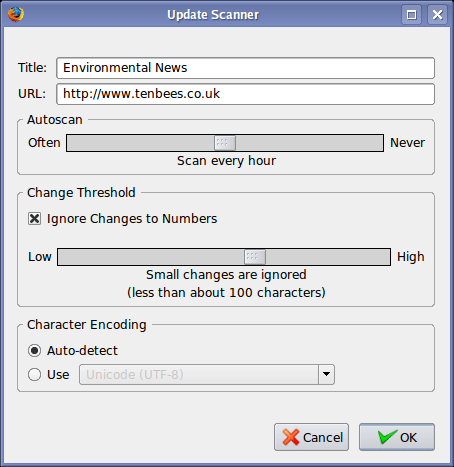
Update Scanner : Monitor Website Changes

When the page changes it shows a notification alert. If you monitor multiple webpages then you can get a quick overview of pages using the arrow button located at the right bottom corner of the screen. Web pages that have been updated will be shown in bold with an arrow next to them.
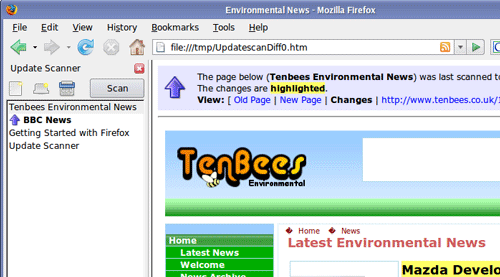
Update Scanner

If you don’t use Firefox then you can try ChangeNotes or ChangeDetection. Both of these websites can monitor requested webpages and will send you an email when something changes.

Monitor Error Pages

Mr. Uptime is a bit different but serves a similar purpose. It’s another Firefox extension that comes in handy when you come across a website that’s experiencing down time. With Mr.Uptime you are able to add such a website to the watchlist and get notified as soon as the website is back online. The following image sums up the whole idea pretty well:
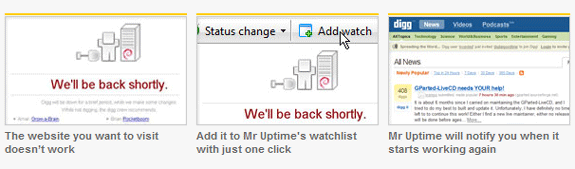
Pingdom - Get Notified

There is also an option to specify the interval at which the page should be monitored. Check out Mr. Uptime video screencast here.


MakeUseOf Recommends

More articles about:

32 Comments

Aibek Esengulov

The guy behind MakeUseOf.com. Follow him and MakeUseOf on Twitter @MakeUseOf. For more details check out MakeUseOf about page.

The comments were closed because the article is more than 180 days old.

If you have any questions related to stuff mentioned in the article or need help with any computer issue, just ask it on MakeUseOf Answers.

Hide 32 Comments

  • Transcontinental April 25, 2008
    0 likes

    Certainly interesting for websites to be monitored in “real-time”. But if longer intervals (12/24 hrs) are enough, dedicated web services do the job just fine. I know since many years the following, :

    changealarm.businessmatter.com/l

    ChangeAlarm is faithful, regular, and really handy. They will notify by email any change in the url pages you will have notified. Easy, at no cost

    | Like
  • Verdican April 25, 2008
    0 likes

    DWiner has a great point. There are many great websites out there that can change a page into an RSS feed. The one I’m thinking of is Page2RSS, which has worked wonders for me in the past. (page2rss.com/).

    A problem I have had with Update Scanner is that it keeps track of all your websites in the TEMP directory. Whenever I ran a program like CCleaner, all the websites I’ve added to Update Scanner would disappear, and I needed to add them all over again.

    | Like
  • Mark O'Neill April 25, 2008
    0 likes

    The problem with Mr Uptime is that if you have thousands, perhaps millions of people using the extension to constantly monitor a site to see if it’s still down or not, that page is going to STAY DOWN!! Because Mr Uptime is just going to constantly ping the domain over and over. So how on earth is the site ever going to come back up again if Mr Uptime is constantly pinging it?

    It’s a good idea but poorly thought through.

    | Like
    • whatever April 26, 2008
      0 likes

      [quote]So how on earth is the site ever going to come back up again if Mr Uptime is constantly pinging it?[/quote]

      that is visitor’s responsibility. they should set the monitoring interval large enough to allow the server to recover or at least reduce the load for the time being, say 15-30 minutes. it is pretty much same at periodic F5 with or without human intervention. and an update can be made to the extension so that the interval doubles after N failed retries.

      | Like
  • Dave April 25, 2008
    0 likes

    Back in the day before my college newspaper had an RSS feed – I programmed a “scraper” in perl. This software basically grabs the webpage, and turns the headlines or text into an RSS feed. It works great but if they change their layout at all it no longer works. Plus there is that nasty issue of copyright. But, in an extreme case, you can turn a normal plain website into an RSS feed! :)

    | Like
    • Webhmaster April 26, 2008
      0 likes

      Yep. I did this too.

      | Like
  • DWiner April 25, 2008
    0 likes

    Feed43 (Feed For Free) is a very useful online application that can churn out feeds from your favorite site that otherwise doesn’t provide RSS.

    FeedYes is also a popular RSS feed service that gives users the same RSS functionality.

    | Like
    • Aibek April 26, 2008
      0 likes

      Thanks for the links, both of the services seem pretty good. I especially like the Feed43.

      | Like
    • Aditya April 27, 2008
      0 likes

      There is another service called Ponyfish (ponyfish.com) which does the same thing. It lets you create RSS feeds for pages that do not have any. It lets you customize your RSS feeds the way you want, which is pretty great in my opinion.

      | Like
  • Sherri April 25, 2008
    0 likes

    Thanks for posting about that FF extension Update Scanner. I’m going to try it out. I hate that there’s still interesting sites that still update, but are clueless about putting in a feed. I did the Bloglines/email thing to sub to many newsletters (eww), but Google Reader became stable at about the same time as Bloglines blew yet another gasket, and I got tired of their stupid plumber.

    | Like
  • Hermund April 25, 2008
    0 likes

    I’ve been using WebSite-Watcher for many years now. It’s an excellent program, designed specifically to monitor wepages at certain time intervals.

    | Like
  • Ken Burgin April 25, 2008
    0 likes

    I don’t think ChangeNotes works any more – it has not sent me information for quite a while and page takes forever to load. Thanks for the tip on ChangeDetection – will try that and see if it’s more reliable.

    Keep up the good work…

    | Like
  • Ron Gejman April 26, 2008
    0 likes

    For webcomics you can try
    comic-nation.com
    It only checks the images, so it can let you know when the comic updates.

    | Like
    • Macskeeball April 26, 2008
      0 likes

      I use Comic Alert for that. It generates a single feed combining all the comics I subscribe to. It includes newspaper comics as well.

      | Like
  • Adam Gershenbaum April 26, 2008
    0 likes

    I’ve used http://www.dapper.net to create my own custom RSS feeds. So far just a few minor kinks I am working out

    I was successful at making a quick and dirty RSS feed of one of my favorite bands The Vincent Black Shadow. Check it: dapper.net/services/TVBSRSS

    Yahoo pipes and rssmix.com are a few other suggestions.

    | Like
  • kapow April 26, 2008
    0 likes

    Check out openkapow.com. You download a RoboMaker application and visually create RSS feeds that you publish to their server. If the page changes, it’s easy to modify the robot you created and republish it. You can also create RSS feeds with images in them.

    | Like
  • Paul B. April 26, 2008
    0 likes

    I love and use UpdatePatrol: updatepatrol.com. It monitors both normal web pages and RSS feeds. It can highlight page changes and display them in a built in browser, or it can send you the page with changes highlighted by email. A real time saver.

    | Like
  • Bill Pier April 26, 2008
    0 likes

    The Firefox add-on addons.mozilla.org/en-US/firefox/addon/920 Page Update Checker (PUC) is probably the most flexible and customizable web page checker, though not as “pretty” as Update Scanner.

    | Like
  • Chris Jakeman April 26, 2008
    0 likes

    http://www.changedetection.com is free and sends email every 24 hours. Worked well for me for years.

    | Like
  • Adrian April 26, 2008
    0 likes

    Yahoo pipes?

    | Like
  • dan April 26, 2008
    0 likes

    I say that if a site doesn’t offer rss I’m not going to follow it. I like using a good old fashion feed reader like Feedables

    | Like
  • Chuck April 26, 2008
    0 likes

    I have used Watch That Page (watchthatpage.com/) for over a year now to check for software updates and other site updates. It emails out a daily digest with clips of changes. Highly recommended to try out. It’s also free, of course.

    Personally, I always recommend using an online service versus a desktop app so you (as well as the application data) are not tied to your PC.

    I just attended a conference where Kapow demonstrated their product, it was very impressive. I’ll be trying that one out at work, but it looks a little more complicated and full featured than what you need for this purpose. If you want to tie in these page changes to some other company service or do other SOA-ish integration, than it would be awesome.

    | Like
  • subcorpus April 26, 2008
    0 likes

    this good info …
    i dont like yahoo pipes that much …
    fan of google … hehe …

    | Like
  • ORB April 26, 2008
    0 likes

    Pity, u r using linux

    | Like
  • Dagonet April 26, 2008
    0 likes

    watchthatpage.com

    | Like
  • Dan April 27, 2008
    0 likes

    You could also simply use Google Alerts with a “site:” search term and something unique to the website – such as the header text on article postings.

    | Like
  • Saul April 27, 2008
    0 likes

    Another way is to use Feed43.com service: it allows to parse any site and to create RSS-feeds

    | Like
  • theMoore April 28, 2008
    0 likes

    dapper.com could be an option

    | Like
  • Free Quiz April 29, 2008
    0 likes

    How convenient, I was planning on programming this same tool however you guys just saved me the time and effort.

    | Like
  • Robert April 30, 2008
    0 likes

    Before firing up an extra piece of software or service, check the source code of the site in question. You may just find out that it loads behind a frame. In that case, just open the frame to find the feed.

    | Like
  • campaign intelligence July 13, 2009
    0 likes

    Does anyone have any idea what the name of the Firefox theme used in the screenshots is?

    | Like
  • Cees October 18, 2009
    0 likes

    Thanks a lot, this post and the comments helps me on my way. I am gonna check out a couple of the things mentioned. Will let you know about it.

    | Like