
Are you sick of constantly seeing words you hate on the web? Replace them. Whether you hate profanity with a passion or want to rid your browser of every unnecessary acronym, the Chrome extension "In My Words" lets you customize the web by replacing any word with another. It also makes for a pretty great prank, if you use it properly.
There are plenty of tools out there for tweaking the way websites work. Stylish lets you fix annoyances on the web, for example, or there's GreaseMonkey. "In My Words" is a simpler tool than those – it lets you tweak the entire web by replacing any word with any other word. It's elegant, but also useful for a variety of reasons - parental filtering, annoyance reduction or just making the web a more comprehensible place.
Replacing Words
To get started simply download In My Words from the Chrome Web Store. Once it's installed, you will need to head to the "Extensions" page in Chrome, which you'll find by clicking the Settings button at the top right and mousing over "Tools". Once you're there, find "In My Words" listed alongside all of your other extensions. Click the "Option" button below it and you can start replacing words:

All you need to do is put a word or phrase in the left column and a replacement for it in the right. Now every site you visit on the web will be magically enhanced. Here's my attempt to make political news more interesting to read in the months to come:

Adorable. You can also use this to give historical figures appropriate nicknames.

You get the idea - any word or phrase can be replaced by any other word or phrase. What could that possibly be used for?
Possible Uses
A few things, depending on your imagination.
- Remove profanity from the web. You can use the classic random symbols (#$%^) or something more creating (mother-loving puppydog). This is perfect for parents, but also for the censorious at heart.
- Make Reddit and communities like it comprehensible by replacing acronyms with words. “Today I Learned” could become “Today I learned”, for example. "NSFW" could become "DON'T CLICK! Just don't."
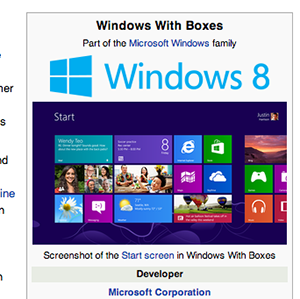
- Give products more accurate names, so you can better enjoy technology sites. See my Windows 8 example above.
- Generally amuse yourself.
Pranks!
Of course, this is hardly the main use for this extension. That honour goes to pranking. Set this plugin up on a friend’s computer and you can drive that person nuts in any number of ways. Replace their name with their name - plus a nickname. Think of the Hitler quote above, but be more creative than that.
Change the name of a famous person or company in an attempt to confuse them. Wait until they start talking about Tweeter or MySpaceBook and laugh. Then laugh some more. You get the idea. Imagine, then make your dreams come true.
Conclusion
Is this the most useful Chrome extension in the history of Chrome extensions? Not really. But it is quite fun, and potentially useful if you're creative.
What are you using "In My Words" for? Let me know in the comments below. Firefox user? There's an alternative you should check out called FoxReplace. It's a little different, but if you're a Firefox user. I bet you can figure it out.