
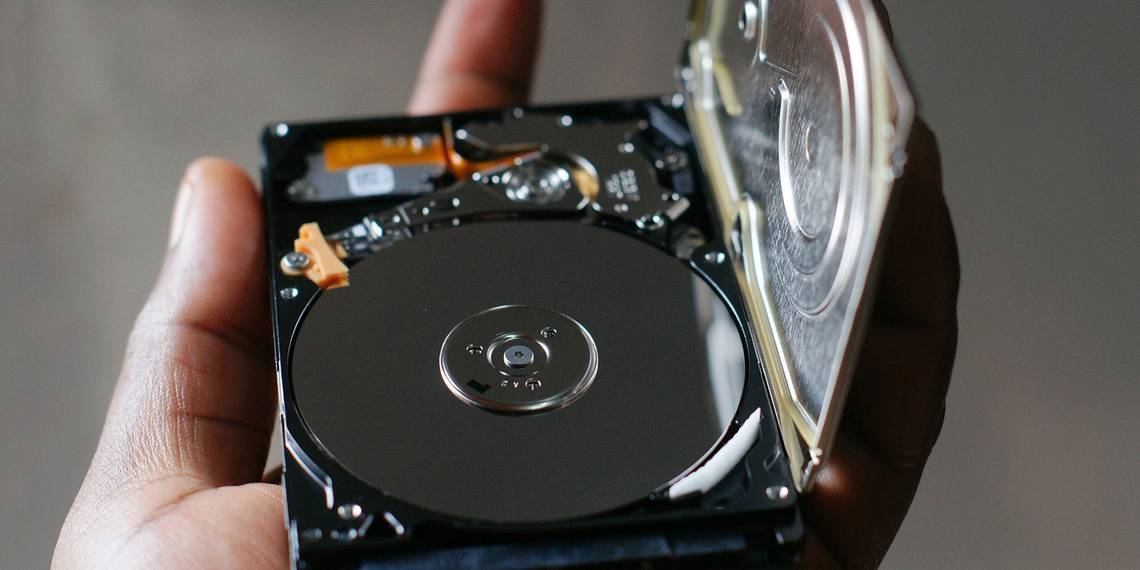
There is data on your hard drive that you want to get rid of. Perhaps the computer is about to be sold or donated to charity; maybe you just want to ensure the data on the drive is totally erased before you use it yourself.
Whatever the case, you can delete the drive in Windows using native or third-party tools.
Why Do You Need to Erase Your Hard Drive?
There are various reasons why you might wish to completely erase your hard disk drive.
You may be concerned about others seeing the data on the drive if you're planning to
- Sell the hard drive
- Give it away
- Donate the PC to charity, church, or a school
However, you might not be planning to part with the device. Wiping the disk might be necessary to:
- Remove a virus or ransomware
- Overwrite sensitive personal data
- Start using a second-hand disk drive that the previous owner has not wiped
You might have your own reasons for wiping your computer's disk drive. Whatever the case, Windows users have two options:
- Native Windows 10 tools
- Third party tools like Darik's Boot and Nuke (DBAN)
Let's look at each option in turn.
The Easy Way to Wipe a Hard Disk Drive in Windows 10
Although some good third-party tools are available, you might be in a bit of a rush. As such, going to the trouble of finding, downloading, and installing software isn't what you want to do.
Fortunately, you don't need to worry. Windows 10 has a dedicated command for wiping your hard disk.
Before proceeding, however, ensure you know the correct drive letter for the disk you wish to erase. You'll find this in Windows Explorer, so make a note of the drive letter. Note that you won't be able to wipe the Windows C drive from within Windows (see the next section for a solution to that problem).
To do this you'll need to use the Windows PowerShell environment, a command line tool into which you can input text-based instruction. The command you're going to use follows this syntax:
Format volume /P:passes
Here, volume refers to the drive letter, while /P is the format command. Meanwhile, passes refers to the number of times you want each sector of the disk to be overwritten.
So, if your drive letter was X, and you wanted five passes of formatting, you would:
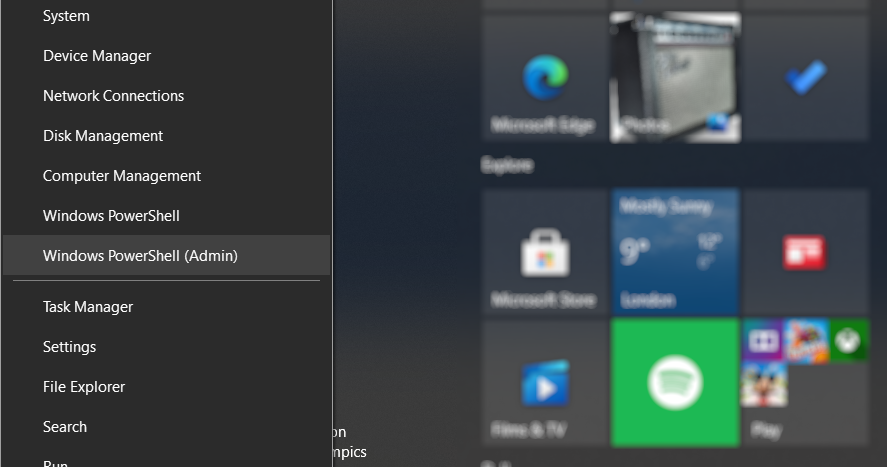
- Right-click Start
-
Select Windows PowerShell (Admin)
-
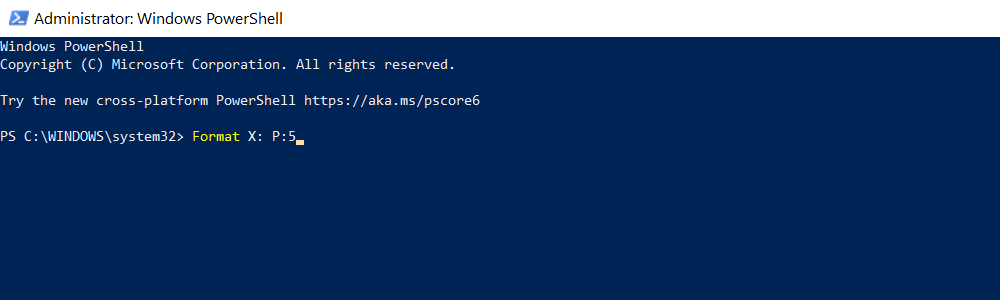
Enter Format X: /P:5


It's as simple as that. Wait while the device is wiped, then reuse it as needed.
Wiping a Hard Drive in Windows 7 and Windows 8
Need to wipe a hard disk drive while using Windows 7 or Windows 8?
You're in luck! The same instructions for Windows 10 will work with earlier versions of Windows, back to and including Vista.
How to Totally Wipe a Hard Drive With DBAN
What if you want to destroy the data on your C: drive? This is typically the disk drive that Windows is installed on and cannot be wiped using Windows' built-in formatting tool.
Several third-party tools are available, but perhaps the best is Darik's Boot and Nuke (DBAN). Designed specifically for the task of destroying data in bulk, DBAN will run in your computer's memory, much like a recovery disk, or a Linux live disk.
Two versions of DBAN are available: the free, personal use disk erasure tool, and the premium Blancco Drive Eraser. You can ignore the paid version (unless you're a business or organization) as the free DBAN will effortlessly delete your HDD.
The free DBAN features permanent data erasure, with six erasure standards, and supports ATA, SATA, and SCSI connectors. This should cover all hard disk drives. But what does this mean? Well, if you need to wipe a hard drive inside your PC tower or laptop, DBAN can handle it.
Ready to back up? Follow these five steps to wipe your hard disk drive.
1. Identify Your Hard Drive
To avoid accidental erasure, start by ensuring you can identify your HDD.
The easy way to do this is to open Windows Explorer and check the C: drive. As long the device is labeled something like OS C: or Windows C: then you're in the right area.
However, problems can arise if the C: drive is one of several and they're all partitions on the same physical disk. This could result in inadvertently overwriting data on all partitions, not just the C: drive.
Right-click the drive letter and select Properties > Hardware to find the hardware name of the device. This will help you to identify the drive in DBAN.
2. Download and Burn DBAN to Disc
Available in ISO format, DBAN must be downloaded to your computer then written to an optical disc.
- Download DBAN from Sourceforge.
- Insert a blank disc into your optical read/write drive.
- Browse to the downloaded ISO file.
- Right-click dban-2.3.0_i586.isoand select Burn disc image.
- Work through the image burning wizard and wait as the disc is created.
When it's done, remember to label the disk. You might want to use it again; conversely, you wouldn't want to load it up accidentally.
3. Back Up Valuable Data
Before you wipe your Windows computer, it's important to make sure that the data on the drive is 100% useless. If there is anything you wish to keep, it should be backed up immediately. Recovery tools will be useless if you accidentally delete data you want to keep. Your data will be irretrievable after using DBAN.
4. Boot Into DBAN
To use DBAN:
- Insert the disc into the drive.
- Restart your PC.
- Choose the option to boot from the CD or DVD drive.
However, this might be easier said than done.
Usually, your computer will boot from the hard drive as usual. If it doesn't, reorder the boot devices in the computer's BIOS. Alternatively, tap a key (typically DEL or F12 – check your computer documentation for details) as the computer starts to prompt the boot selection screen.
With the right boot device selected, DBAN will start, ready for you to begin deleting hard disk drives.
5. Wipe Your Hard Drive With Darik's Boot and Nuke

Several options are available on the DBAN screen:
- F2 to learn about DBAN
- F3 for a list of commands
- F4 for troubleshooting
- Tap Enter to use DBAN in interactive mode
- Enter the phrase autonuke to let DBAN automatically wipe every drive on your computer
You probably don't want to use the last option. Instead, use the guided mode to wipe your disk drive:
- Tap Enter to start guided mode.
- Use the arrow keys to select the device you wish to wipe.
- Tap Space to flag the drive with the [wipe] flag.
- When ready tap F10 to commence the wipe process.
Some other options are available. Shortcut keys listed at the bottom of the screen let you make changes to the wipe process.

- Use P to change which random number generator is used to destroy your data.
- R changes the number of passes for each disk sector. This multiplies the default passes for each available wipe method. For example, the default DoD Short has three passes by default, so using R lets you change this to nine passes by specifying a value of 3.
- M, meanwhile, gives you a choice of six erasure methods, including DoD Short, DoD 5220.22-M,and Gutmann Wipe.
- A verification mode (V) can also be enabled, although this lengthens the wipe process.
A timer in the top-right pane of the DBAN tool displays the duration of the wipe process. Eventually, a new screen should appear with "pass" highlighted in green next to the disk drive name. You're free to reuse the drive.
If the word "fail" appears instead, try using DBAN again. If this happens repeatedly, consider physical destruction (see below).
What Can You Do With a Wiped Hard Drive?
Once your hard disk drive is wiped, it can be safely sold or reused.
For example, you might sell it on eBay to raise some quick funds, or you could use it to build a PC for a relative.
The most important thing to note is that the data is almost impossible to retrieve. You can do anything with the disk without the data being uncovered. Want to make doubly sure? Employ some physical destruction to the device, perhaps by drilling through the drive places.
Alternatively, open the disk and hammer the platters, the magnetic disks where your data is stored.
Safely Wipe a Windows Computer With DBAN
While other tools (including some built-in options) can remove the data on your Windows hard drive, the safest option is to wipe with DBAN or a similar tool.
DBAN is simple to use – perhaps too simple. Indeed, without due care and attention, you could accidentally delete the wrong disk drive. Using DBAN successfully requires you to:
- Write the ISO file to DVD
- Identify your hard drive
- Boot into DBAN
- Wipe your Windows hard drive
Once that's done, the drive can be reused, or safely disposed of. If the drive is struggling with poor performance before you wipe it, you might prefer to recycle your old hard drive.