
Why download files to your computer, only to upload them somewhere else? Save yourself some unnecessary clicks by "downloading" files directly to the cloud, skipping your hard drive altogether.
Cloud Save sends would-be downloads directly to web-based services, including Dropbox, Google Docs, Facebook, Flickr, Picasa and more. Simply right-click a file, then decide where you'd like to send your file. It's a feature so mind-bogglingly useful you'll wonder why it's not built into Chrome to begin with, particularly as Google prepares to sell laptops sporting Chrome OS.
The extension is the work of antimatter15, who is still actively improving it. It's working wonderfully for me so far.
Using Cloud Save
So you stumble upon a file you want to send to a web service. Assuming you've already installed Cloud Share [No Longer Available], all you need to do is right-click the link to the file:

As you can see, you'll find the "Cloud Save" option in the menu. Pick the service you want to send your file to; this will of course depend on the type of file it is. If this is the first time you've used a given service with Cloud Save, you'll be asked to authorize the app. Authorizing Dropbox looks like this:

Be careful to actually authorize the app: not doing so could cause a service to not work. I had to re-install Cloud Save to get Dropbox working, after accidentally clicking no.
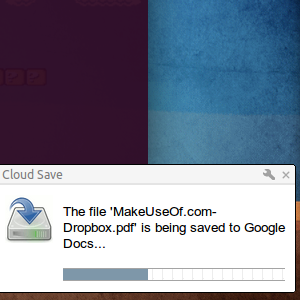
Once everything is authorized, the transfer will begin. You'll see a Chrome-style alert with the progress:

How long this will take obviously depends on the size of the file, so be patient.
You can also use the settings page to upload a file from your computer:

This isn't in line with the purpose of the app, but I could see some using it from time to time.
Supported Services
There are quite a few services supported by Cloud Save, many of which are MakeUseOf favorites. The current list includes:
- Picasa
- TwitPic
- Flickr
- Posterous
- Twitrpix
- Twitgoo
- Imgly
- SugarSync
- Dropbox
- Google Docs
- Min.us
- Cloud App
- Amazon Cloud
- DropIr
- WebDAV
- Dropdo
This is a nice variety of applications. There are the storage apps, such as Dropbox or Sugarsync, and the more socially inclined apps such as Facebook or Flickr. Those looking to send photos elsewhere should be particularly pleased, because there is no shortage of photo-related apps in the above list. Support for more web apps may well be in the future, so stay tuned.
Having the ability to save files to a particular folder in Dropbox and other services would be nice. I wonder if that's coming eventually?
Conclusion
I like seeing stuff like this, because I like software that simplifies life. By allowing users to send files directly to web apps, instead of requiring them to download and re-upload a file, Cloud Save is certainly a program that can save you some time.
What do you think? Is Cloud Save a good idea, or do you prefer doing things the old fashioned way? Or do you consider this entire "cloud" thing to be some sort of fad? As always, share your thoughts in the comments below.