![]()
How fast is your Internet connection, really? Your Internet service provider quotes you speeds, but how do you know if you’re actually getting the speed you’re paying for? You can find out using one of these free tools. And, if you’re not, there are some things you can do to increase your Internet connection speed.
You can’t measure your connection speed based on how fast it seems during normal use, as websites won’t necessarily make use of your full download speeds. These tools will make use of all the bandwidth your connection has available, ensuring you a fairly accurate measurement.
The Speedtest Broadband Speed Test
Before using Speedtest, ensure no other programs are using your connection. For example, if you have a BitTorrent client or another file-downloading program running, you should pause your downloads. This doesn’t just apply to your computer – if you have other computers sharing an Internet connection, ensure they’re not actively using your connection either. This will help you get a more accurate picture of just how fast your connection is.
Open the Speedtest page and click the Begin Test button to get started. Speedtest will automatically choose a nearby server and try downloading and uploading a file. It measures the speed when doing these transfers, and the speeds you see should be fairly representative of your Internet connection’s speeds.

JD’s Auto Speed Tester
Speedtest is useful, but it only gives you a snapshot of your Internet connection speed at one point in time. It doesn’t tell you how consistent your connection speed is or whether it regularly fluctuates at certain times of the day. To monitor your Internet connection speed over time, download JD’s Auto Speed Tester.
JD’s Auto Speed Tester will perform regular Internet connection speed tests in the background, providing you with a record of your broadband speeds. You can see a graph of your Internet connection speeds over time, allowing you to see just how consistent your Internet connection speeds are.
This program is quite powerful. It allows you to set up emails – you can get email alerts when your Internet connection speed drops to a certain level or receive regular updates on your Internet connection speed. You can also have it not perform tests when certain programs (such as file-downloading programs) are open.
Even if you prefer to run Internet connection speed tests manually and not on a schedule, this program can be useful. It will save each test results and provide a graph, while Speedtest won’t remember any previous results for you.

What If You’re Not Receiving the Speed You Were Promised?
If you’ve run these tests and found that you’re not receiving the speeds your Internet service provider promised, you’re probably wondering what you can do to increase your connection speed.
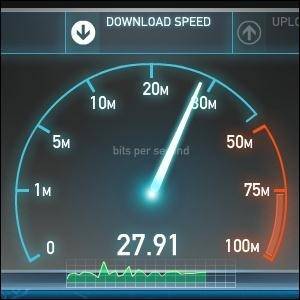
Here’s the bad news: Internet connection speeds can vary. Internet service providers can’t promise you an exact speed, as your actual speed can depend on the amount of load on the network, how far you are from your Internet service provider’s hardware, and other factors. Sometimes this can even be to your benefit – for example, in the screenshots above, I’m getting over 27 Mbps (Mbps stands for megabits per second). However, my ISP only advertises a maximum of 25 Mbps – so I’m getting extra speed.
However, in many cases this won’t work out to your benefit. You’ll probably have an actual speed that’s a bit lower than the speed you were promised. If you look up your service plan details, you’ll probably see a footnote saying that your ISP can’t promise you an exact speed.
On the other hand, wide variations can indicate a problem. For example, if you were promised 25 Mbps and you’re receiving 23 Mbps, that’s within the margin of error. However, if your plan offers 25 Mbps and you’re consistently receiving 8 Mbps, this can indicate a problem. Internet service providers can make mistakes – I once upgraded to an Internet service plan with higher speeds. After upgrading, I ran a speed test program and noted that my speed hadn’t gone up. After a quick phone call to my ISP, they realized that they hadn’t actually flipped the switch and given me the higher speeds I was paying for. This fixed the problem, and it’s possible no one would have noticed if I hadn’t tested my Internet connection speeds.

Tips for Improving Your Speed
Before you go calling your Internet service provider and asking them to check your speeds, ensure you run multiple tests at different times – a single test isn’t enough to indicate a consistent problem. You should also ensure that no one else on your network is using your Internet connection, as you’ll see slower speeds in the tests if something else is maxing out your Internet connection.
If you’re receiving poor speeds, it’s also possible that there’s an issue on your end – not your Internet service provider’s. For example, if you’re on a wireless network, you could be receiving a weak signal. Check out these tips to improve your wireless signal and ensure your router is using the ideal wireless channel. To eliminate wireless connection problems, try plugging your computer directly into your router with a wired Ethernet cable and then running a broadband speed test. And even if you are receiving good results in your speed tests, it’s possible your ISP is throttling BitTorrent downloads and other types of traffic, slowing it down.
How did your Internet connection speeds measure up? Are you getting the speeds you’re paying your Internet service provider for? Leave a comment and share your experience!
Image Credit: Connect the cable to the network switch via Shutterstock
MakeUseOf Recommends
More articles about:
Hide 86 Comments
Good article I use speedtest.net pretty regular which is great for finding the capacity of your isp plan that you are paying for.For finding out my actual speed and what nots I go to http://www.ispgeeks.com/wild/ they have a plethora of tools.To get the best result I suggest signing up for a free account that way you have access to more on their website.
Speedtest will keep a record of your tests, if you sign up.
Good tip, but at least the desktop app will do it automatically!
Another case where it might make sense to call up your ISP is when a variety of tests yeild speeds that are consistently below a slower tier. For example, say you’re paying an extra $20/month to go from a 30 megabit tier to a 60 megabit tier, but you can’t get anything faster than 30 megabits, you may want to quesiton your ISP as to what exactly you’re paying the extra $20 for.
Yup, that is exactly the issue I had in the past, more or less.
I am checking this any month, just to be sure (:
I use speedtest frequently, so far the result seems ok. It seems that I am getting the speed that I pay for, although I do find the fee for the speed is rather steep (oh well, not the point).
^ totally agree
Well, after seeing the heading I thought there might be tips , tweaks and tricks to improve your bandwidth/speed. To be fair I am disappointed with the article.
Well, you can improve some things, like your Wi-Fi speed, but generally this is out of your control.
if your ISP is giving you 20 Mbps down, there’s not really much you can do to get more than 20 Mbps. You can try moving closer to a data center or buying a higher speed tier, but this sort of thing is out of your control.
Thanks for the article.Now I know my broadband speed
The JD Autospeed link above leads to an installer that sets off every AV I tested it against all showing A Trojan inside the installer. Just a heads up.
@ Martin Wallis
Yea i have had a lot of trouble with false positive Trojan detections , but if people let me know what AV programs are detecting it i can do something about it. As of a couple of days ago VirusTotal was only showing 1 detection and that company i can not contact.
Please read :-
http://www.gmwsoftware.co.uk/anti-virus-info.html
https://www.virustotal.com/file/027ae2e47520321b25438d3fe738f56ae44c8b784707c24c38b82b27441604c6/analysis/1352045443/
Thx all,
JD.
Sorry if double posted (it ate my last attempt)
The installer downloaded fine but Malwarebytes caught the trojan trying to execute while the exe had only been downloaded.
I’m not so sure it’s a false positive. A downloaded exe file should not do anything until it is executed.
i can assure you it is a FP http://forums.malwarebytes.org/index.php?showtopic=117361
i suspect the exe in question was the update.exe which will execute directly on the first load of jdast (although if you had not even run jdast then i dunno) but i do know there is no Trojan.
Thx ,
JackDinn.
Sorry you had a problem. I myself downloaded and installed the file and did not see any antivirus warnings. After I was done with it, it uninstalled normally.
I supposed to get 12-15 MB of Cable Internet Service but…
Download: 5.76 Mbps
Upload: 744 Kbps.
How Sad!!
Yikes! Maybe try again at a non-peak time, like the middle of the night?
That was the velocity that tooks @ 1:15AM… I don’t know if the router interferes with velocity, but I think I’m paying so much for a low speed. :/
Oh man, you makes me sad. Here even download in 500kbps is a dream that never comes true in my city.. Haha..
I wanna cry here.. Haha..
i get only around 20 kbps
OK, you make a little happy now.. :D
Download: 93.79 Mbps
Upload: 77.00 Mbps
Cool, but that means Megabit per second right?
Now that’s an Internet connection!
wow where are u, at the CIA
Lol xD
Romania
Wow, Romania has awesome speeds!
Nice post, but there are many factors that influence the speed..server location and peerings are the most important in my opinion.
Also the isp providers sometimes has their own speed test page… where you can get very good results but that doesn’t apply for the whole world.
Anyway using the internet just for servers in my country i get 30/50 mbps download and somewhere around 20 mbps upload
For the rest of the world using speedtest.net somewhere around 8 mbps for a good price i think. just 14 euros
@ Garey Boone i’ve done a basic speed test with the recommended page here’s what i’ve got http://mcs.ispgeeks.net/myspeed/db/report?id=964491
The problem with speed testing is that for instance, if you are on ADSL or especially ADSL2, distance to exchange (not as the crows fly, but actual cable length) and age of copper cable play a really big factor.
The speed that your ISP quotes you is SYNC speed, so for instance, my internet connection ADSL1 is 8Mb Dn/384Kb Up.
My router syncs at that speed, but it isn’t what i would truly get, overhead accounts for a small amount, line quality, etc… all play a part in it too.
Not to mention congestion at the exchange level.
Besides just running a speed test, if the speedtest shows a significant drop, and your router isn’t syncing at the speed of your account, then you need to have every thing in between looked at too.
That’s about right. It’s in your ISP’s control, all you can do is ask them to look at everything in between.
@ Martin Wallis
Yea i have had a lot of trouble with false positive Trojan detections , but if people let me know what AV programs are detecting it i can do something about it. As of a couple of days ago VirusTotal was only showing 1 detection and that company i can not contact.
Please read :-
http://www.gmwsoftware.co.uk/anti-virus-info.html
https://www.virustotal.com/file/027ae2e47520321b25438d3fe738f56ae44c8b784707c24c38b82b27441604c6/analysis/1352045443/
Thx all,
JD.
Ask the ISP to empty the cache on your account and then test. This is normally done annually but it may help.
i have got a very strange problem. i have got a plan which promises me higher speeds at night after 10pm. but for the past 3 4 months I have not been able to get this speeds. the day time is normal as promised. And then at night the speed drops to horrible levels! It is not even the normal day time speed. I contacted the ISP and they said there is problem at their side and that they have made the plan changes correctly. I am not understanding what to do :(
Well, all you can really do is talk to your ISP about that, unfortunately.
Good article! I’m on Linux and I wanna know if there is a way to know if my neighbors are using my connection and if possible what they’re doing ( .i.e check the network activity). What’s the best software for that.
If you use a wireless router you can check the router log to look for any odd MAC addresses, but if someone knows what they’re doing that is not always going to work to catch them.
secure your connection.
Yup, log into your router’s web interface (you’ll find instructions in its manual) and you can see this sort of thing. You should also really encrypt your connection with a password while you’re at it!
I am getting the exact speed as the broadband has said to me
I check it daily !
Don’t forget to check other hardware compatibility, like whether the Modem supports such speed or not. It’s one of the most common mistake people make.
Good point. Generally ISPs provide their own modems for this reason.
Providing OSX and Linux script solutions would be helpful as well.
MacKeeper is a NOTORIOUSLY bad site!!! I’m appalled that you’d allow this to be posted on this site!!!
Now I seriously wonder and question the validity of MakeUseOf, unless your in the “bag” for these types of “rip-off” sites!!!
I’m extremely disgusted and disappointed that MacKeeper would be used as a broadband tester!!!
Shame on the jerk that used them as a barometer!!!
P.S. I’m using a high-speed iMac and the test showed only 1.3 mbps and is a scam to try to seduce you into buying MacKeeper!!!
Someone there is a “lap-dog” for MacKeeper! Is it you, Chris Hoffman ???
What the hell ever happened to verifying before posting this B.S. garbage???
Start out with a good article, then post a fraudulent or very bad link……..then the whole story becomes “tube steak” and flushed down the toilet !!!
Bud,
What fraudulent or bad link are you referring to?
Bud, I am the managing editor. Can you please clarify what you mean by a fraudulent link?
And the story is perfectly fine, so I fail to see why you refer to it as “B.S. garbage”. Chris and I would appreciate a little bit more explanation.
I have never heard of Mackeeper and I don’t see any links to it in this article. Can you clarify what you’re talking about, please?
From what you said earlier, perhaps there was an advertisement for Mackeeper on a web page? I don’t have control over that.
Yup.
Pay for 30Mbps Fibre Optic.
Get up to 36 most of the time.
I have a poor connection as 4 Mbits.. That’s a normal speed you can afford to pay here at my place… But anyway, I get most of the time 3,7-4,0 Mbits of speed! But what I don’t get is, that sometimes during the evening, the internet is very slow, but the speedtest shows a speed at 4 Mbits..
That’s odd. It’s possible that the connection is just flaky at that time with lots of packet loss and speed fluctuations.
i dont think verizon throttles speeds but at&t does
Thanks JDs program is great.
And you said that Speed check does not record your tests…yes they do.
After testing click on Compare Your results. It shows how you compare with
the world and if you scroll down it shows your recent tests for comparisons.
Ah, sorry about that, I clearly missed that!
If you happen to be using Frontier fiber they will tell you 75% of advertised speed is “good enough”. The answer to the obvious question — Can I pay 75% of my bill — is negative. Yes I left Frontier.
Yup, ISPs always say this sort of thing. It’s very unfortunately, but there’s not much you can do (aside from switching ISPs, as you did!)
My ISP “Airtel” promised me 2.00 Mbps.
But, i’m getting 256 kbps (ie. download/upload speed is +/- 30KB/s).
EIGHT times lower than the promised speed..
That’s worse. That’s a very big variation.
That is quite slow. I’d definitely contact them about it; it’s their job to explain this to you or fix it.
They say that “i’ve crossed my plan limits”. It’s not fair..
In a month, for 28 days i get 256 Kbps. For the remaining 2 days, i get 2.00 Mbps. That’s really worse!! Atleast they could give 512Kbps.
Oh, so they’ve throttled you because you used a lot of bandwidth (or what they see as a lot). That’s too bad, but there’s not much you can do about that unless you switch to a different ISP or different plan.
I Have to change my ISP.
I’m using 8Mbps line, I get around 7.5Mbps coz I live bit away from the exchange. But most annoying thing with my ISP is bandwidth caps.
thanks for this very nice
I think the problem is in the picture above. The dude is plugging his cable in upside down!
Man, those stock photo sites need to have more attention to detail!
27Mbps thats really fast. Mine registered 1.03Mbps
fortunately yes… i got the 512 Kbps package, and usually it fluctuated between 400-500 Kbps
always checking just to be sure
I am a TWC RR customer using their basic service. Even so I see speeds faster than advertised. With that being said, I have also used their RR Turbo and do not get the speeds advertised.
(I like how the pic shows the DSL cable plugging in upside down!)
It depends on a variety of things, including how far you are from your ISP’s hardware and how many people are using the connection at a time.
I have been using JDs program this week and it is showing amazing speeds compared to the tests I run on Speedtest.net. The upload speeds are always comparable but the download speeds really differ.
For instance I just tested with both
JDs say 5.21 mbps and Speedtest says 1.06 mbps
Why do you think there is such a difference. They were taken within seconds of each other.
Thanks
Good question. It’s possible Speedtest.net doesn’t have any server close to you but JD’s does. This is very dependent on the program’s servers — if they’re too slow, far away, or just bogged down, you’ll see lower speeds. The servers must be faster at downloading and uploading than you are, or the speeds you’ll see will be limited by the servers, not your own internet connection.
I know Speedtest has a server in a city fairly close to me. It is a mystery why they differ so. And who do I trust? The higher or lower reading?
I notice it really varies in JDs comparison chart. It can be anywhere from 3.5 mbps to 19 mbps. I guess the idea of the comparison is to see an average over time.
Thanks Chris.
JDast actually uses multiple servers to test from and in multi-threaded mode , so in its default mode its download test is from 4 different servers and they are all incoming at the same time.
This way it has the best chance of “maxing out” your connection and if one of the servers is having a “bad day” then that should not affect the throughput as the others should take up the slack.
Of course you can change all these setting if you wish in the configs.
I’m getting better than advertised! Same at work, too. Could use more download speed, but I’m afraid we’d lose the upload (which is well above spec as well), so we’re holding off.
Really great article.Thank you so much.
very good
It always shows my speed very accurately on desktop but not on my android phone.
I knew one or two links, but very good article! Thank you.
Cheers!
Márcio Guerra
Thank You Chris! This helped me analyze my own connection speed, and it was not such great news!
How much should wifi degrade your connection speed if any at all?
With a solid Wi-Fi connection that isn’t getting much interference, you shouldn’t see much of a degradation in connection speed.
However, there is a bit more latency — if low latency and low ping times are important to you (for example, for gaming), then a wired connection is more ideal.
I have been using speed test for a long, and its really great. I haven’t seen any other speed test website like this
A ping of 9 ms!! Heavenly ;-)
here is a step by step guide, to change to a faster DNS, if you are using iDevices
http://iphonage.com/faster-iphone-internet/