ArchBang Is Lightweight & Always Up To Date [Linux]

archbang linuxInstall a lightweight operating system that’s always up to date. Featuring the speedy Openbox desktop and built on the rolling release Arch Linux, Archbang delivers both minimalism and up-to-date software. Best of all, it’s a lot easier to set up and use than a vanilla Arch installation.

In a world full of lightweight Linux distributions, why look at ArchBang? For one thing, it’s fast. It’s like CrunchBang, only built on Arch instead of Ubuntu. OpenBox is a very lightweight window manager, and Arch is known for its speed. If you dig minimalism, you’ll love ArchBang. This isn’t just a stripped-down system, however. With ArchBang you have access to Arch’s always-up-to-date library of software. Best of all, stability isn’t compromised for the sake of staying up to date, another key feature of Arch.

So while this system isn’t for everyone, ArchBang’s own Linux website sums it up best: “Suitable for both desktop and portable systems, it is fast, stable, and always up to date.”

The Desktop

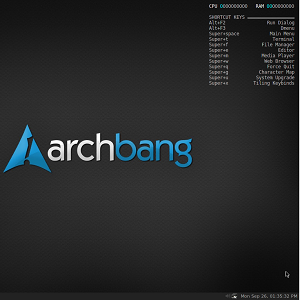
Boot ArchBang and you won’t see much. There’s a black wallpaper, a list of keyboard shortcuts, and a very simple dock:

archbang linux

Where is the menu? Simple – just right-click on the desktop. You’ll see the complete selection of applications here:

lightweight linux os

Alternatively, instead of using the menu, you can use the keyboard shortcuts listed on the desktop. One you get used to these shortcuts they will become natural to you, and you’ll wonder why you ever bothered with menus before.

Want to change what’s in the menu? A GUI menu editor gives you that power:

lightweight linux os

Traditionally OpenBox menus are edited by hand, so it’s nice having an alternative means.

Browse the menu and you’ll find various ways to tweak your operating system. Highlights include turning special effects like shadows on and off, and changing the desktop theme.

Included Software

So what can this operating system do out of the box? If you’re like most people, the web browser is the first thing you’ll be looking for. Good news: ArchBang comes with Chromium, which Chrome users should be more than comfortable with.

lightweight linux os

The office applications offered by default include AbiWord, the best free lightweight word processor, and, of course, image editor The Gimp is offered for anyone needing to edit images:

archbang linux

Want to know more about included software? Find the complete list of ArchBang software here.

Installing ArchBang

First things first: download ArchBang here. You’ll get an ISO file that works as a live CD.

Once you’ve booted into ArchBang from CD you can install the system. You’ll find the installer in ArchBang’s menu, and it’s relatively self-explanatory if you’ve ever installed Linux. The ArchBang Wiki features installation instructions if you get stuck.

Conclusion

Whether you’re a netbook user looking to squeeze more performance out of your tiny computer or just a Linux enthusiast looking for something new to play with, ArchBang is worth checking out. In fact, it just might become your go-to operating system.

But that’s just what I think. What do you think? Is there a better Arch-based system out there? Or is it best just to install Arch yourself? Share your thoughts in the comments below.


MakeUseOf Recommends

Justin Pot

Justin Pot is a blogger based in Boulder, Colorado who loves technology, people and nature. He tries to enjoy all three whenever possible. Check out JustinPot.com or, if you like audio, you can listen to Justin, alongside James and Dave, on Technophilia, earth's favorite Technology podcast.

The comments were closed because the article is more than 180 days old.

If you have any questions related to stuff mentioned in the article or need help with any computer issue, just ask it on MakeUseOf Answers.

Hide 49 Comments

  • Drcropper October 7, 2011
    0 likes

    Crunchbang is based on Debian Squeeze not Ubuntu.  Cheers

    | Like
    • jhpot October 7, 2011
      0 likes

      Oops. It used to be based on Ubuntu; I guess they switched. Sorry!

      | Like
  • Shark0360 October 7, 2011
    0 likes

    I’m an Ubuntu user and just recently discovered ArchBang which I installed on my Virtualbox. In one word….”Awesome!”

    Going to kick the tires for a bit and if it satisfies me I just might make the switch.

    | Like
    • jhpot October 7, 2011
      0 likes

      Let us know if you decide to switch, okay?

      | Like
  • Gökhan Kocak October 7, 2011
    0 likes

    After having installed new software, do I have to update the menu manually like in Crunchbang Openbox or does it add the new programs automatically?

    | Like
    • jhpot October 7, 2011
      0 likes

      I’m not entirely sure, I’m sorry to say. Anyone else know anything?

      | Like
      • Gökhan Kocak October 8, 2011
        0 likes

        Do You mean You did not install any additional software after You installed Archbang? After all, You strongly recommend it. You could have installed something and looked for it in the menu.

        Does Archbang have a graphical software manager for pacman?

        If You don´t review it properly, You should not recommend it as a “go-to operating system”. Maybe harsh but have a look at other reviews at distrowatch.

        | Like
        • jhpot October 8, 2011
          0 likes

          I do pretty much everything in a text editor and a web browser, except for editing images. Gimp was already installed, so I never needed to install any software while using ArchBang. You’re right, though: I should have installed something to find out, but unfortunately I didn’t think of it.

          There isn’t a graphical installer; you will have to use it from the command line.  I apologize if I don’t have all the information you need.

          | Like
          • Gökhan Kocak October 9, 2011
            0 likes

            Ok, I think the install via CL is the dealbreaker for me personally, but thank You for looking into that. And pretty cool if the out-of-the-box system suffices.

            | Like
          • jhpot October 9, 2011
            0 likes

            Installing from the command line is awesome once you get used to it; I’m primarily an Ubuntu user but I hardly ever use anything but apt-get. But I can understand it being a dealbreaker for some.

            | Like
  • Marvinudy October 7, 2011
    0 likes

    As a dedicated ‘distro hopper’ I found AB a great ‘gateway’ distro to learn how to do things incrementally above the ‘newbie’ level.  This is a much simpler route than jumping into the standard Arch from scratch or Gentoo with dependency hell. 

    | Like
    • jhpot October 7, 2011
      0 likes

      You’re certainly right: this is a great way to get started with Arch.

      | Like
      • DeepDayze October 9, 2011
        0 likes

        Yes, also you can install KDE if you wanted to as openbox does not stomp all over your KDE settings and vice versa

        | Like
  • Timothy Gichunge October 8, 2011
    0 likes

    Well, I first downloaded Archbang, tried it.. I had issues with my monitor’s resolution. There was flickering at the bottom of the screen. I fixed it but later it re-emerged so I decided to try Chakra (kde+arch). Chakra’s user interface was cool but it felt more like beta software plus a number of packages weren’t in the repositories. Eventually, I decided to try Arch. Arch doesn’t come with a desktop GUI so after installing, I had to set up one. I installed gnome shell then xfce4.  Installing and configuring the GUIs was hectic, very hectic but once they were up and running it was clear Arch Linux was going to become one of my favourite distros. After configuring and installing much of what I needed, I finally made up my mind to wipe out ubuntu and clone arch into to the big partition ubuntu had taken. Yep, Arch linux is a gem. You gota use it to understand why it performs way better than debian based distros. I like its package management alot. Unlike debian based systems, installation of packages is smooth and doesn’t consume resources. Very efficient overall.

    Posted from Arch Linux

    | Like
    • jhpot October 9, 2011
      0 likes

      I should give Arch a serious try from scratch one of these days, but for now I’m impressed with Arch-Bang.

      | Like
  • Anonymous October 8, 2011
    0 likes

    Once it comes out of Alpha, IMO Chakra-Project will be the best “easy” Arch distro. For those of you that don’t know, Chakra is an easy to install Arch distro that’s pure KDE4/QT. I’ve been following its development for a year or two and they’re making (slow) progress, everything works out of the box and almost nothing needs to be configured but it’s a pain in the butt that it’s a pure KDE system. Even though GTK libraries are available in the repositories it can sometimes be cryptic as to what you need for an app to run properly. Their version of the AUR (called the CCR) is a good start but it’s lacking.

    In the end the best Arch distro is just vanilla Arch.

    | Like
    • jhpot October 9, 2011
      0 likes

      I’ll keep my eyes out for Chakra, and also give vanilla Arch a spin soon.

      | Like
  • Shark0360 October 9, 2011
    0 likes

    Well…Yes I made the switch and it totally rocks!!!

    To answer jhpot question on how to update software, you have to use the command line using “Pacman” ( # pacman  -Syu ). Pacman is a wonderful yet powerful package manager. The more you use and learn the many query commands, the more I’ve come to love Arch Linux.

    Simply amazing and blazing fast!!!!

    | Like
    • jhpot October 9, 2011
      0 likes

      Thanks for your comment, and for the Pacman tutorial!

      | Like
  • Archvortex October 9, 2011
    0 likes

    Justin,

    Thanks for writing the article! 

    To answer the question about the menu, the 2011.10 release has an application pipe menu with icons that automatically updates. If you want to add/change things to the rest of the OB menu, it is done manually just like in CrunchBang. 

    Those looking for a GUI for software management will be disappointed but hey, this is Arch and “we don’t need no stinkin’ GUI’s!” LOL But seriously, once you become familiar and comfortable with the terminal, you’ll wonder why you bothered with GUI’s in the first place.

    Gimp is no longer included in ArchBang to decrease the size of the .iso, but is easily installed. Wicd has been replaced by networkmanager and Firefox Aurora (FF9) is the new web browser. 

    Thanks again for writing the article and come visit us at the ArchBang Forums and Wiki.

    Regards,

    archvortex  ( ArchBang Wiki Admin/ Forum Mod)

    | Like
    • jhpot October 9, 2011
      0 likes

      Thanks for taking the time to comment, Archvortex. Very helpful for our readers.

      | Like
  • nasser alshammary October 9, 2011
    0 likes

    What’s the name of the theme u use? it looks like google’s new look.

    | Like
    • jhpot October 9, 2011
      0 likes

      Like Archvortext said: the theme above is called Elegant Brit.

      | Like
  • Archvortex October 9, 2011
    0 likes

    The theme is Turquoise Nights II for the latest release. The theme in the screenshots above is Elegant Brit.

    Regards,

    archvortex  ( ArchBang Wiki Admin/ Forum Mod)

    | Like
  • Anonymous October 9, 2011
    0 likes

    You don’t mention dmenu; that is the ultimate keyboard application starter and very addictive: you do alt+f3, type the first letters of you application select it when necessary with right arrow key and enter and whoops.
    Pacman, the installer tool of Arch, is the great strength of Arch and therefore AB; when you look at the terminal feedback, you will be able to solve a lot of problems where synaptic leaves you clueless.

    | Like
    • jhpot October 10, 2011
      0 likes

      Excellent tips, thank you. I should try out dmenu because that sounds useful. A lot like alt+f2 or Unity’s search.

      | Like
  • DeepDayze October 9, 2011
    0 likes

    Distros like Archbang and Chakra are a quick and dirty way to get into Arch, but at some point you’ll need to learn the Arch package tools and philosophy, and the Arch Wiki is well written and easy to understand so you’ll have an easier time grasping the concepts behind Arch Linux.

    If you do go the Arch-from-scratch route you can install the entire KDE suite for example by installing a meta-package like this after you do the base install plus installing Xorg

    # pacman -S kde-meta

    GNOME and Xfce have similar metapackages as well if you wanted to install those desktop environments.

    I myself dabbled in Arch and like Debian its well thought out and solid (I am a Debian user  :) )

    | Like
    • jhpot October 10, 2011
      0 likes

      Meta-packages are awesome; thanks for the tip.

      | Like
  • Anonymous October 9, 2011
    0 likes

    How does ArchBang work with wifi? I know Arch isn’t the best distro to install on a system with wifi only. I really want arch on my free from Google cr48, but installing it without a ethernet connection is a  living hell. So my main question is, “Does ArchBang come with an easy to set up wifi connection utility?

    I do on the other hand love using Arch on any system that mainly uses an ethernet connection.

    | Like
    • jhpot October 10, 2011
      0 likes

      Why don’t you try it on a live CD and find out? Networking worked simply for me,  but a little bit of research goes a long way.

      | Like
      • Anonymous October 10, 2011
        0 likes

        You are telling me “a little bit of research goes a long way”? Aren’t you the one who reviewed a Distro without even installing any extra software on the distro you were reviewing? The research is technically your job if you are going to review a distro and then recommend it to people. I am a Sys. Admin for Network Solutions. I was looking for something that might be a little bit more lightweight for my cr48. I can do all the research, I know how. I just have no time or that. Which is why occasionally I will read a review or two on some lightweight distros. It seems you need to do the research before you review and recommend a distro. Don’t get me wrong I love Arch Linux and have used it for many years, but I do know that if I were to review and recommend a distro to the public, I would be the one doing all the research. I hope your future posts/reviews are a bit more detailed than this one was. Thanks or nothing, I’ll research it myself.

        | Like
        • jhpot October 10, 2011
          0 likes

          All I’m saying is it worked on my computer, but I’ve no way of knowing if it will work on yours without access to your hardware. Sorry.

          | Like
  • Mpalencia October 10, 2011
    0 likes

    I think it’s really cool, I’ve been using arch for the last 7 years and I really like it, I used to compile err “use” gentoo before but once I started with arch I stayed with it, I use OSX on my macbooks but on the workstation and servers it’s always arch.

    | Like
    • jhpot October 10, 2011
      0 likes

      ArchBang hasn’t been around for 7 years, so I’ll assume you mean Arch. And it seems like many former Gentoo people are using Arch now; why do you think that is?

      | Like
  • Technicallyblue October 10, 2011
    0 likes

    If you revisit the Arch Bang Page there is a link provided that will take you to some instructions to create your own Arch Bang! http://willensky.blogspot.com/

    | Like
    • jhpot October 10, 2011
      0 likes

      Not a bad tip.

      | Like
  • Archvortex October 11, 2011
    0 likes

    Totally agree with DeepDayze. Installing ArchBang to use Arch without installing it the conventional way doesn’t excuse the user from doing their homework and learning about their system. The answers you receive in ArchBang/Arch Forums aren’t step by step pablum fed answers. We assume you know your system and can use a terminal. If you don’t then your Arch experience will not be pleasant. This isn’t a distro for noobs :)

    I still use Gentoo for most of my computing needs. I think a lot of people get tired of compiling, setting flags, etc and as their computers get older and system upgrades take longer, they look for faster alternatives. Gentoo can be quite time consuming and nowadays people look to make the most of their time. Arch still allows high configurability and control for a system at a faster speed. ArchBang has a low memory footprint and requirements, which which can give older computers and laptops a new lease on life and provide users a functional quick computer again.

    | Like
  • Blabla October 13, 2011
    0 likes

    I had installed both crunchbang (the debian based version) and archbang and couldn’t feel any difference in speed.
    Two years ago I have installed archisolive. In the meantime it has become pure Arch and is now my main operating system. Sometimes I had smaller hickups (xfce shutdown one time and printer issues: I had to reinstall the printer) after the update. However it’s very stable and I like the rolling release approch (up to date browser and so on).

    pacman is pretty easy to use, no need for a graphical tool. However for friends I have installed zorin (ubuntu-based, lxde, fast), because it’s easier to them.

    | Like
    • jhpot October 13, 2011
      0 likes

      Thanks for the rundown. Would you recommend I check out Zorin at some point?

      | Like
  • Semperex October 13, 2011
    0 likes

    Well i wanted to try Arch…and did several attempts at installing it….never got it right….foud out about AB…installed on first try…never looked back since!

    | Like
  • Cicas October 23, 2011
    0 likes

    Great article!
    As a netbook user, I’ve been always looking for something light and speedy. After hell with Fedora on my old machine, where I discovered XFCE, I was totally sure no fedora anymore. So my new netbook went ubuntu (10.10 netbook) very quickly and xfce came right after that.. but it wasn’t as light as I wanted it to be. After a while, i discovered a LXDE desktop environment (which uses OpenBox), which finally provided me what I was looking for – but.. Out-of-the-box distro Lubuntu is just piece of ****, wifi non-working and many other troubles. Much better was classic ubuntu+lxde metapackage – until I’ve switched to 11.04 (about two weeks ago). After that my friend showed me a WattOS, which I’m using now. It’s a really nice piece of work and I can’t figure out why Lubuntu is such a ****. Another appealing distro is LXDE version of Mint with its update management, which is a bit hazard in Ubuntu (and WattOS).
    But deep inside I’ve always felt these cyclic updates are not my cup of tea and rolling releases were always a +1 when considering new distro. Unfortunately those distros had too many cons against this one. But maybe that’s finally changing. I’m downloading ArchBang and I’ll post my experiences after trying.
    Thans a lot for showing me a new hope! :)

    | Like
    • jhpot October 23, 2011
      0 likes

      Let us know how it goes!

      | Like
  • David Sena October 27, 2011
    0 likes

    I love arch so much. After him, my linux experience change greatly. I like ubuntu, i like other, but i cannot imagine myself returning to them. The pacman is a lot more faster then debian based distros. The install and updates are 10 times faster. I am not speaking about the internet speed, but in the way like the sistem process the packages. Try and surpreend yourself.

    | Like
  • Rohan Choukkar November 12, 2011
    0 likes

    Like the article said – ArchBang just became my go-to operating system!

    | Like
    • jhpot November 14, 2011
      0 likes

      Enjoy.

      | Like
  • Bsdsolarux November 14, 2011
    0 likes

     Thanks for review, albeit not a full one ;)

    archbang seems like one of the fastest “WORKING” distro’s outta-the-box I’ve ever hopped onto. :)   nice.
     
    btw, I found a great “DOC” in Archbang, for all your above needs, to get you started.
    -just press “Super + r” combo keys on your OpenBox desktop and it’s all there.

    | Like
    • jhpot November 14, 2011
      0 likes

      It is fast, and I hope that keyboard shortcut helps some people out.

      | Like
  • Undefined November 26, 2011
    0 likes

    If you get used to Archbang, then there is no harm in ‘trying’ to setup arch as Archbang even though minimal has software pre-installed while in Arch, you actually have ONLY what you want.. Not even a single thing which is not going to be used by you

    | Like