10 Free Image Editing Programs for your PC

Photographs are little gems and just like with shaping a rough diamond it requires a lot of work as well as skill to reveal the true and full beauty of a simple snapshot. And there are a thousand different ways to get there. Here are ten image editing programs that may come in handy one way or the other.

    1. GIMP
    The GNU Image Manipulation Program is a powerful and free piece of software that can handle all basic image editing tasks and much more beyond that. The fact that it’s open source and available for UNIX platforms, Mac and Windows makes it extremely flexible.

    1. Paint.NET
    This is probably the most powerful free photo editing software on the market. It can complete simple tasks such as red eye correction, resizing, cropping, but it also supports layers. The program is open source and a great collection of user created plugins is available from its online community.

It’s hard to recommend one over the other here, so depending on what you want to do with these programs, Paint.NET and GIMP are probably equally great…given you are a Windows user.

    2. Autostitch
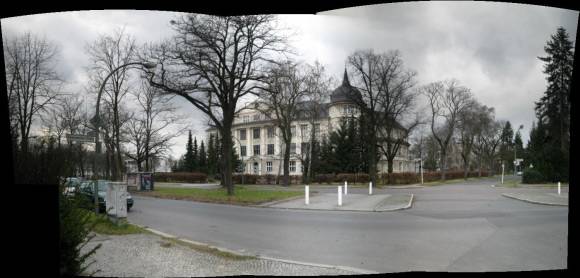
    This is the perfect tool if you want to create panorama images from a series of photos. It works fully automatic and doesn’t require user input. The program can handle both horizontal and vertical stitching. The demo is fully functional and free. One thing you have to be prepared for though is the amount of system resources this program will occupy, depending on the options you select. The image below was stitched together from six individual pictures. It took less than 30 seconds, but I used simple default settings.

    Image Panorama Generator

    3. Microsoft Reserach Group Shot
    If you need to take a photo of a large group of people, chances are that no matter how many shots you take, there won’t be a single photo everyone is happy with. This is where you should give Microsoft Group Shot a chance. With this software you can select your favorite parts in each shot of the series and the program will merge all your photos into the perfect composite image. Unfortunately, it appears the beta software download has expired, however future releases are around the corner.

    4. TKexe Kalender
    It’s the New Year and maybe you still need a paper calendar. To quickly create a personal and unique edition, try this easy to use software.

    5. Opanda PhotoFilter
    Filters can make a photo very interesting and special. But it’s tiring to carry around filters for your camera or play with camera or software settings endlessly to yield the desired results. Easier yet, use Opanda PhotoFilter to post process your snapshots. The program comes equipped with more than 100 different settings simulating Kodak, Cokin and Hoya filters.

    6. Foto Mosaik
    Create a mosaic picture from hundreds or thousands of photos. See example below.

    Photo Mosaic Generator

    The mosaic image is the eagle displayed in the top left, the rest of the image is a zoom into the single tiles, indicated by the red frame.

    7. Win Morph
    Morph, warp and distort images in a professional and high quality way. This program gives you all the freedom you could possibly ask for from a free package. It works as standalone application or as a plugin for various video editors, it offers advanced keyframing, blending and distortion tools for total control and can even do dynamic morphing with various input (JPEG,BMP,PCX,PNG,PBM,TGA,TIFF) and output (JPEG,BMP,PNG,TGA,TIFF,AVI,MPEG and SWF) file formats. Are you sold, yet? No wait, it’s free!

    8. Free Digital Camera Enhancer
    This is the tool to give your digital images the final touch. Reduce noise caused by bad light situations, smooth skin in portraits, correct the midtones, and add saturation. Naturally, this will work best on bad images.

    9. JPEG Lossless Rotator
    With most programs, the simple act of rotating your JPEG photo into the right orientation and saving it causes a loss of quality. JPEG Lossless Rotator does the job without recoding your photo. Rather it performs a special lossless block transformation which leaves the quality of your photo untouched. Yes, this is a tool for freaks…or geeks.

That’s about it, on the same note MUO also covered online image editing apps and you can read about them at 5 powerful Online Image Editing Tools .

This article was contributed by Tina from Recommended

If you found this article useful then please help us spread the word by Stumbling It.

Filed Under: Uncategorized

If you like this article then subscribe to MakeUseOf feed and get latest articles delivered to your Feedreader. If you want to recieve latest articles in your email click here. It's FREE!

What's next ?:

Most Popular:
  • 1 Awesome Gmail tip You Don’t Know about. Seriously.
  • 100 Portable Apps for your USB Stick (both for Mac and Win)
  • 40 Unusual Websites you should Bookmark.
  • 13 Bargain Websites That are Cheaper than eBay
  • 5 Packs to Transform Windows to other OS
  • The Best, Free Alternatives to Nero CD/DVD Burner
  • 7 Excellent destinations to watch TV Shows for FREE
  • 5 Tools to Make Windows XP Look Like Vista
  • 18 Free Ways To Download Any Video off the Internet
  • Watch Popular TV Shows,Cartoons,Movies,Anime for free
  • Gmail Craze: 40 + Tools and Hacks for Gmail
  • Ultimate GMail Collection: over 80 Tools and Tips
  • Collection of Rapidshare Tools and Tricks
  • 5 “DISPOSABLE” Web Accounts to Keep Your Identity Safe
  • 3 Excellent Sites to Get Free Document Templates
  • Are you a geek ? Want to get famous ? Join MakeUseOf.com

    Comments RSS | Trackback URI

    13 Comments Leave a Comment

    2008-01-28 19:34:31

    Great list of creative resources here!
    AutoStitch sounds particularly clever!
    Thanks!

     
    Comment by Mark O'Neill
    2008-01-28 19:44:44

    I have recently started using GIMP and I am amazed at how similar it is to Photoshop. GIMP really is a very powerful piece of software and is remarkably easy to use (compared to Photoshop which is horrendously difficult!)

     
    Comment by AL
    2008-01-29 01:01:41

    If you take pics with your mobile, chances are you will spot noisy pixels all over the shots especiall y if they are night shots. This is where Imagenomic Noiseware comes in handy. Noiseware is a high-performance noise suppression software tool designed to decrease or eliminate noise from digital photo or scanned images. Give it a try you’ll be amazed by the results!

     
    Comment by Shubby
    2008-01-29 02:17:21

    Very nice list of programs. Its amazing how one can change the outcome of photos taken. I will definitely be using these..Thanks

     
    Comment by todd lucier
    2008-01-29 10:20:09

    Very nice, but I think if we look out on the horizon we’ll see that the web based editing tools like those by picnil, fotoflexer and snipshot might be better options…
    aren’t most applications going to be in the cloud a few years from now….

     
    Comment by Tina
    2008-01-29 10:20:33

    Thanks for the suggestion AL, I will definitely check it out. To anyone interested, Imagenomic offers a “Standalone Community Edition” of its Noiseware software for download. It’s freeware and you can see a comprehensive list of which functions it’s lacking compared to the standard and professional edition here.

     
    2008-01-29 19:01:54

    [...] 10 Free Image Editing Programs for your PC | MakeUseOf.com - This is a great list of image editing tools. They run the gamut of things you can do with your graphics. Posted on January 29, 2008 in links by admin [...]

     
    Comment by Syahid A.
    2008-01-31 08:31:36

    You miss Photoscape. But thanks for Autostitch heads up.

     
    Comment by Larry
    2008-01-31 15:49:11

    #3 doesn’t work anymore. MS yanked it.

     
    Comment by Tina
    2008-02-01 03:28:07

    @ Syahid: I had several more programs on the list originally, before replacing them with something else, Photoscape was one of them. I preferred Free Digital Camera Enhancer and subsequently took Photoscape off the list.

    @ Larry: MS states that Group Shot is expecting a new release soon. Hopefully that’s true and hopefully it will remain a free tool.

     
    2008-02-03 23:27:36

    [...] 10 Free Image Editing Programs for your PC [...]

     
    2008-04-28 00:37:32

    [...] for PC (UGH!) you can look here: 10 Free Image Editing Programs for your PC | MakeUseOf.com for image editing software. For your mac, i really like Imagewell. ImageWell 3.5.2 - [...]

     
    Comment by Photoshop masking
    2008-05-07 04:35:45

    Great list..
    . If you have any simple or complicated images which you think will look fantastic with a new background just contact SBL and be sure your images will certainly take a brand new look in the hands of SBL image masking professionals.

    Regards,
    Sai BPO Services

     
    Name (required)
    E-mail (required - never shown publicly)
    URI
    Your Comment (smaller size | larger size)
    You may use <a href="" title=""> <abbr title=""> <acronym title=""> <b> <blockquote cite=""> <cite> <code> <del datetime=""> <em> <i> <q cite=""> <strike> <strong> in your comment. All comments are moderated. If your comment does not show up immediately, be patient. It will show up momentarily.
    © 2007-2008 MakeUseOf.com. All rights reserved. Design by Unique Blog Designs.