
Quick Links
Key Takeaways
- The Google Play Store is Android's app store where you can download games and apps.
- Use the search bar at the top of the Play Store to easily find new apps. Tap an app's name to view more information.
- Check which apps are outdated by going to the My apps & games section of the Play Store. You can set Google Play to automatically update apps for your convenience.
New to Android and not sure how to manage your apps? We'll explain where to find the app store on Android so you can install new apps and update your existing ones.
What Is the Android App Store?
Google Play, also known as the Play Store, is Android's digital storefront where you can download Android apps and much more. If you don't see the Play Store on your device's home screen, swipe up from the bottom of the screen to open your app drawer, then find it using alphabetical order. If you still can't find it, use the search box on your home screen or app drawer.


Once you open the Play Store, a few tabs at the bottom of the screen let you navigate the shop's offerings. Games and Apps function similarly to each other, allowing you to browse using the tabs at the top. Try For you to see what Google Play recommends, Top charts to see what's hot, or Categories to dig deeper into a specific area.
The Offers tab holds promotions inside various apps. And while we focus on games and apps here, it's also worth checking the Books tab if you're interested in downloading ebooks or audiobooks on your Android device.


Unlike many aspects of Android, the Google Play Store is the same across devices. So whether you have a Samsung, Pixel, or other Android phone, the Play Store should look and act the same (though Google Play's catalog can differ by region). That said, the Samsung Galaxy Store does have some differences from Google Play you should know about if you use a Samsung device.
How to Download and Install Apps on Android
The easiest way to get new Android apps is to use the search bar at the top of Google Play. Tap it and type what you're looking for; you'll see suggestions as you type.
After tapping a suggestion or Enter on your keyboard, a list of results will appear. Next to each app's name, you'll see basic info like its developer, user rating, and number of downloads. If you want to refine your search, use the buttons at the top to set a minimum Rating, show only Premium (paid) apps, and more. Depending on your search, you may see sponsored results and/or large callout boxes for especially popular apps.


Tap an app's name to bring up its Play Store page, which contains a wealth of information about it. In addition to the basic info shown before, you'll also see screenshots, a description of the app, user reviews, information to contact the developer, and similar apps. The About this app section is the most useful, as it contains a full writeup of what the app does, along with an App info section that shows when the app was last updated, the download size, Android permissions requested, and similar.
Tap the green Install button to download the app to your device and install it all in one step. Note that if you open the app page for an app you already have installed, you'll see buttons to Uninstall, and Open or Update (as appropriate), instead.


If you see a prompt to accept a list of app permissions here, take caution, as you are downloading an old app that's not designed for Android's modern permission system. Most Android apps will ask you for needed permissions as they come up during usage.
How to Install Android Apps From Your Computer

You can also install apps on your Android phone by using the Google Play website on a computer. Make sure you're logged into the same Google account you use on your Android phone, then browse the catalog or search for what you'd like to install. On an app's page, click the Install button.
If you have multiple Android devices tied to your account, select the one you want to download it on. The app will then install on your Android phone or tablet, ready for you the next time you use it.
How to Update Apps on Android
The Play Store isn't only for installing new apps; it's also where you keep them up-to-date. You may get an occasional notification letting you know app updates are available, but you don't need to wait for that. To check for available updates, open the Play Store, tap your profile icon in the top-right, and choose My apps & games.
On the resulting Overview tab, you'll see Updates available with a count of your apps that don't have the latest version yet. Tap this text to see an individual list where you can pick which apps to Update, or hit Update all to install the updates all in one go. Tapping the dropdown arrow will show the patch notes for the latest version.


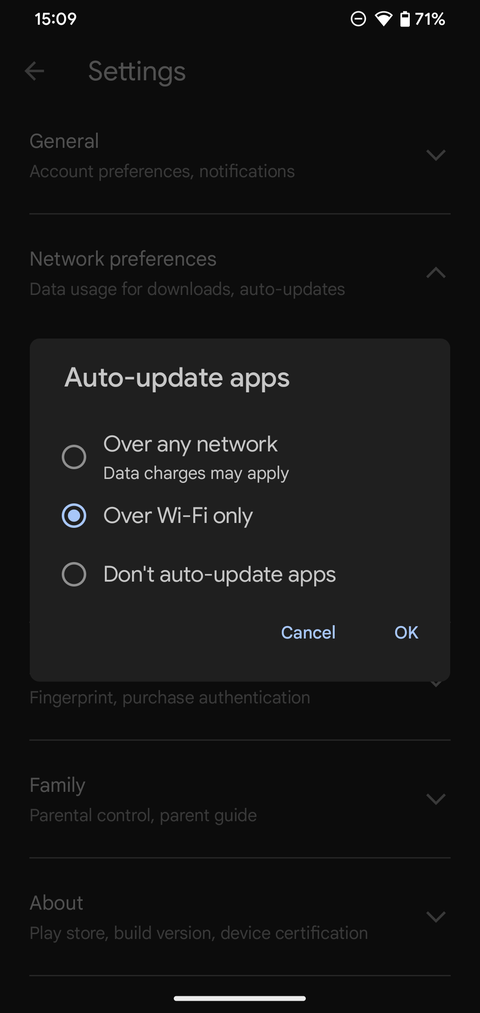
For best results, you should set Google Play to automatically install updates so you don't have to micromanage them. To do this, tap your profile icon on the main Google Play page again, then choose Settings. Under Network preferences, tap Auto-update apps and choose Over any network or Over Wi-Fi only—you can also choose Don't auto-update apps.
The best option is Over Wi-Fi only so you don't have to check for updates manually all the time, but also don't waste your mobile data. It's still a good idea to open the My apps & games menu occasionally in case any app updates fail. If you have repeat problems, see what to do when Google Play auto-updates don't work.
If you don't want to see alerts about pending updates, expand the General tab on the Settings menu, tap Notifications, and disable the Updates available slider. It's a good idea to disable Updates completed, as alerts that an app update is finished are unnecessary noise in your notification drawer.


If you change your mind about an app and want to erase it, see how to uninstall apps on Android.
Google Play Fixes and Alternatives
That's all you need to know about installing and updating Android apps; the process is simple and unobtrusive. But if you run into problems with Google Play or it doesn't have what you're looking for, there's more help available.
For example, there are common reasons why you can't download certain apps on the Play Store. We've also explained what to do about the "unfortunately Google Play Service has stopped" error.
If you don't like the Play Store for whatever reason, it's possible to get your Android apps from alternative sources instead. See the best Android APK download sites and learn how to sideload apps on Android if you'd like to break outside Google Play. Just remember that doing so means forgoing the Play Store's protections.